Set up MCP配置 MCPMCP をセットアップConfigurar MCPConfigurar MCPSetup MCPตั้งค่า MCPThiết lập MCP
Choose your AI app, get a FastMoss key, and verify the connection with a real TikTok Shop data question.选择你的 AI 应用,获取 FastMoss Key,再用一个真实的 TikTok Shop 数据问题验证连接。AI アプリを選択し、FastMoss キーを取得して、実際の TikTok ショップデータ質問で接続を確認します。Elige tu aplicación de IA, obtén una key de FastMoss y verifica la conexión con una pregunta real de datos de TikTok Shop.Escolha seu aplicativo de IA, obtenha uma chave FastMoss e verifique a conexão com uma pergunta real de dados da TikTok Shop.Pilih aplikasi AI Anda, dapatkan kunci FastMoss, dan verifikasi koneksi dengan pertanyaan data TikTok Shop yang nyata.เลือกแอป AI ของคุณ รับคีย์ FastMoss และตรวจสอบการเชื่อมต่อด้วยคำถามข้อมูล TikTok Shop จริงChọn ứng dụng AI của bạn, lấy khóa FastMoss và xác minh kết nối bằng một câu hỏi dữ liệu TikTok Shop thực tế.
Choose your AI选择你的 AIあなたの AI を選択Elige tu IAEscolha sua IAPilih AI Andaเลือก AI ของคุณChọn AI của bạn
Pick the AI client or model you use below and follow its config, remote or local.在下方选择你使用的 AI 客户端或模型,按它的远程或本地配置操作。使用している AI クライアントまたはモデルを選択し、リモートまたはローカルの設定に従ってください。Elige el cliente o modelo de IA que usas a continuación y sigue su configuración, remota o local.Escolha o cliente ou modelo de IA que você usa abaixo e siga a configuração dele, remota ou local.Pilih klien atau model AI yang Anda gunakan di bawah dan ikuti konfigurasinya, remote atau lokal.เลือกไคลเอนต์หรือโมเดล AI ที่คุณใช้ด้านล่าง แล้วทำตามการตั้งค่าของมัน ไม่ว่าจะระยะไกลหรือในเครื่องChọn ứng dụng hoặc mô hình AI bạn dùng bên dưới và làm theo cấu hình của nó, từ xa hoặc cục bộ.
Verify your connection验证连接Verify your connectionVerifica tu conexiónVerifique sua conexãoVerifikasi koneksi Andaตรวจสอบการเชื่อมต่อของคุณXác minh kết nối của bạn
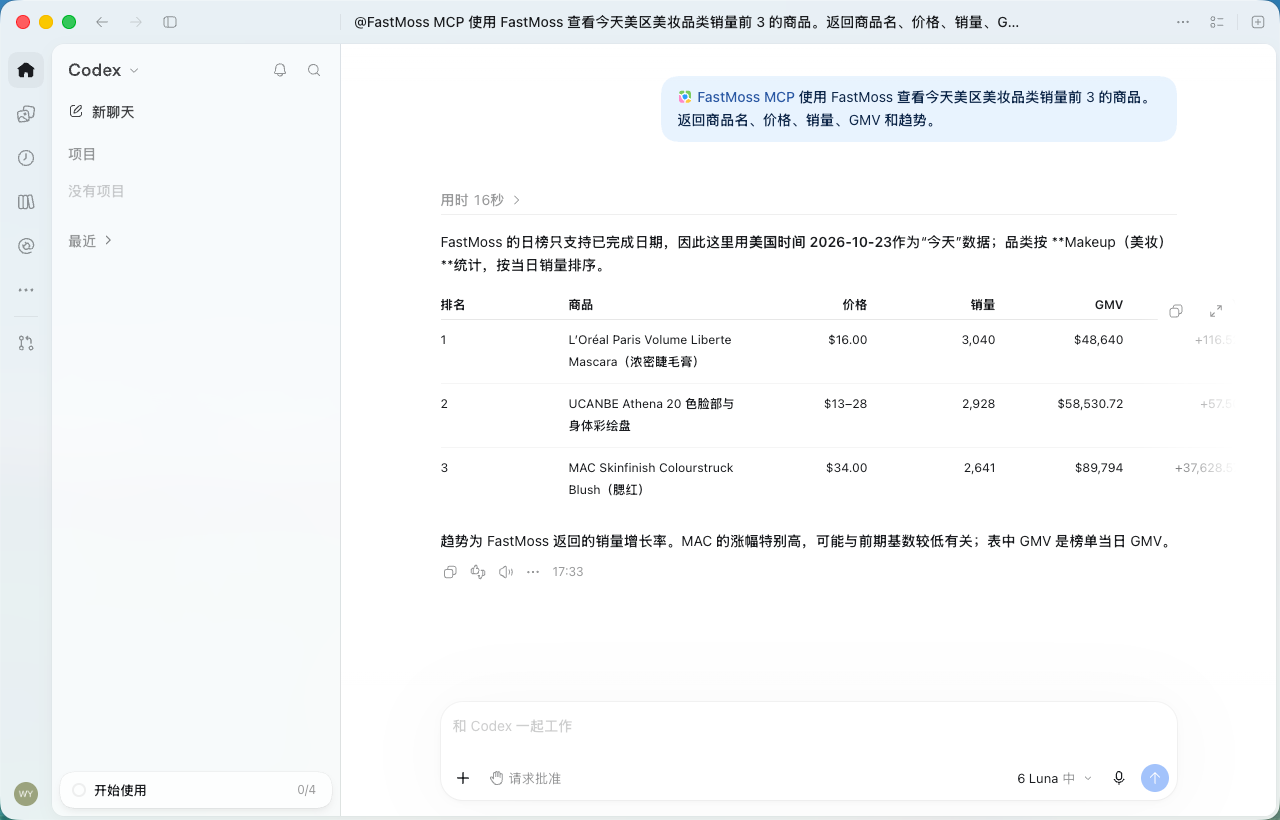
Run one real business query to confirm that live FastMoss data is available.跑一个真实业务查询,确认能拿到 FastMoss 实时数据。実際のビジネスクエリを実行して、FastMoss のライブデータが利用可能であることを確認します。Ejecuta una consulta comercial real para confirmar que los datos en vivo de FastMoss están disponibles.Execute uma consulta comercial real para confirmar que os dados ao vivo da FastMoss estão disponíveis.Jalankan satu kueri bisnis nyata untuk mengonfirmasi bahwa data FastMoss langsung tersedia.รันคำค้นทางธุรกิจจริงหนึ่งรายการเพื่อยืนยันว่าข้อมูล FastMoss แบบสดพร้อมใช้งานChạy một truy vấn kinh doanh thực tế để xác nhận dữ liệu FastMoss trực tiếp đã sẵn sàng.
ChatGPT / Codex
Steps步骤StepsPasosEtapasLangkahขั้นตอนCác bước
- 1Download the ChatGPT desktop app here.从这里下载 ChatGPT 桌面版。ChatGPT デスクトップアプリをダウンロード。Download the ChatGPT desktop app here.Download the ChatGPT desktop app here.
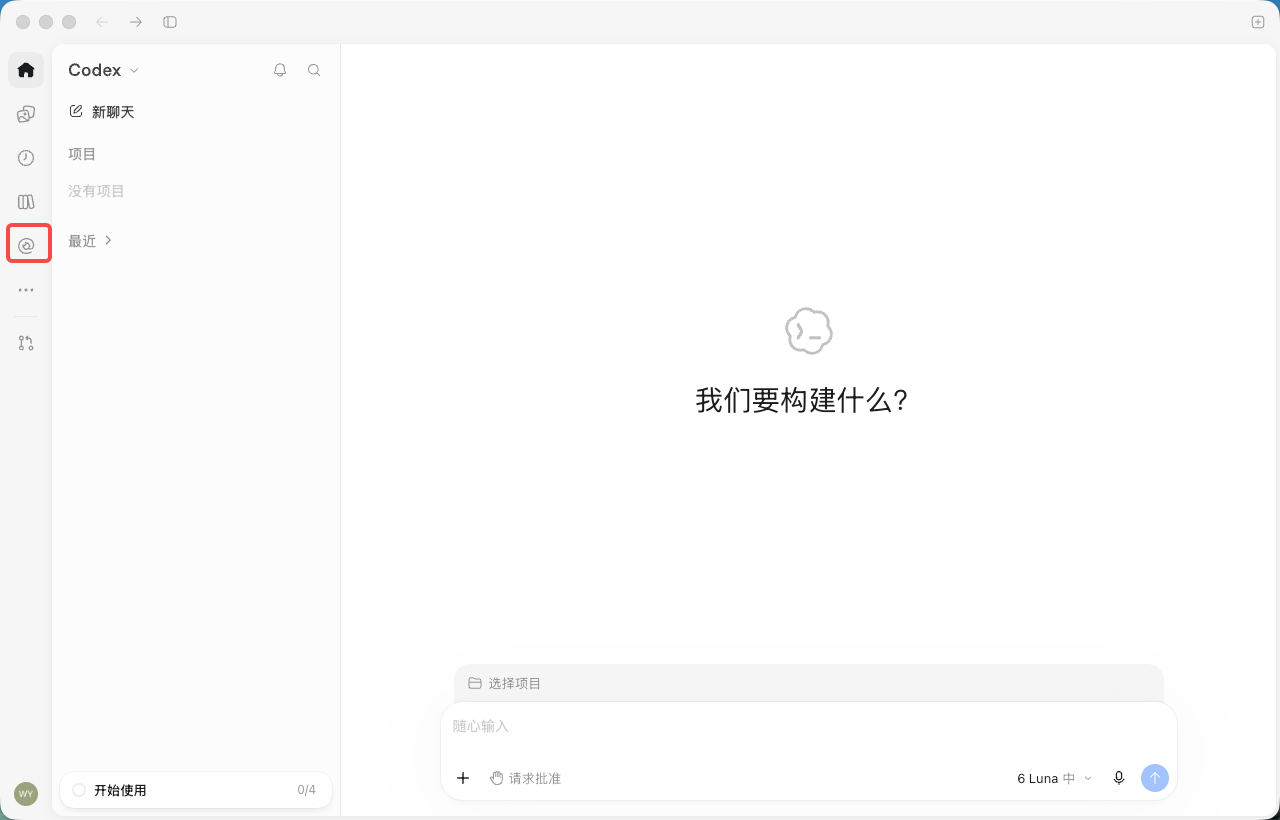
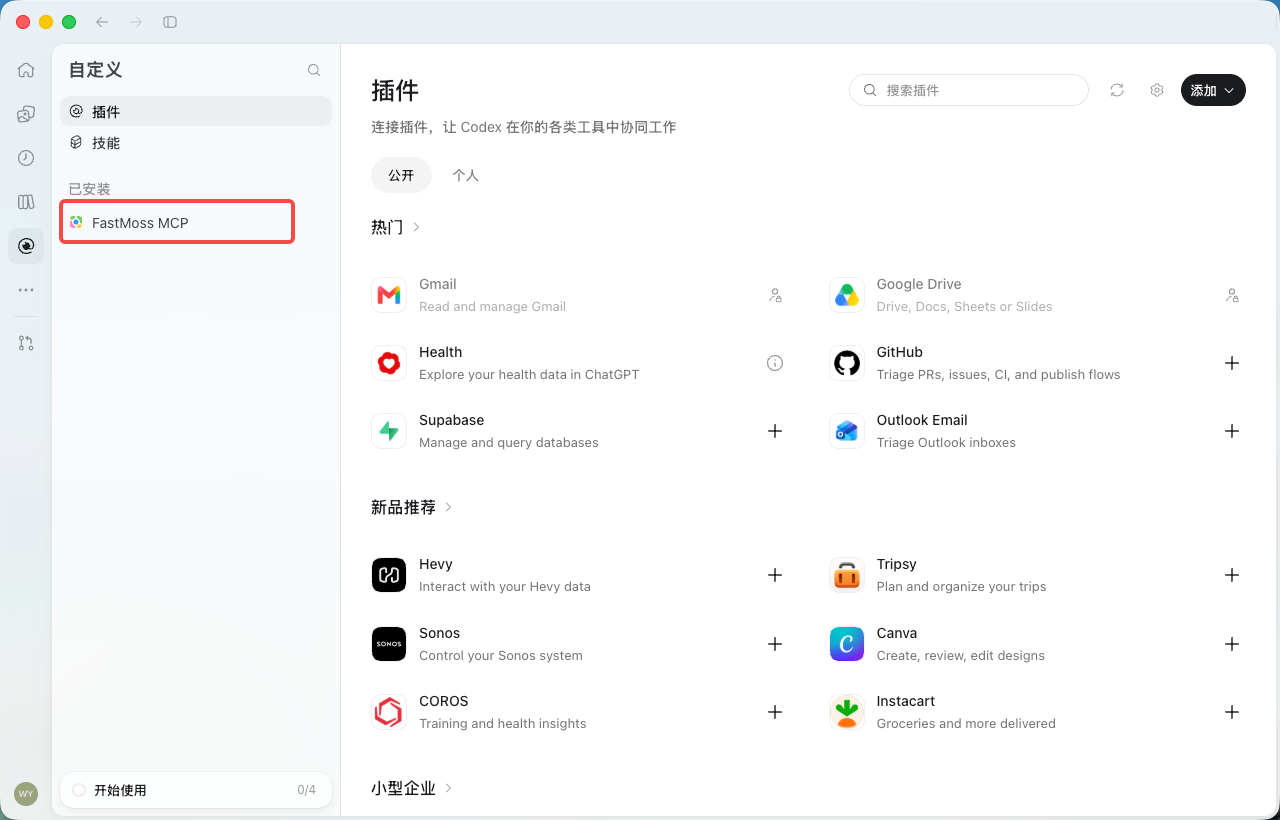
- 2Open the app and click the "Plugins" icon in the left sidebar. The entry is the same in ChatGPT and Codex.打开应用,点击左侧边栏的「插件」图标。ChatGPT 与 Codex 入口相同。アプリを開き、左サイドバーの「プラグイン」アイコンをクリック。ChatGPT と Codex で同じ入口です。Open the app and click the "Plugins" icon in the left sidebar. The entry is the same in ChatGPT and Codex.Open the app and click the "Plugins" icon in the left sidebar. The entry is the same in ChatGPT and Codex.
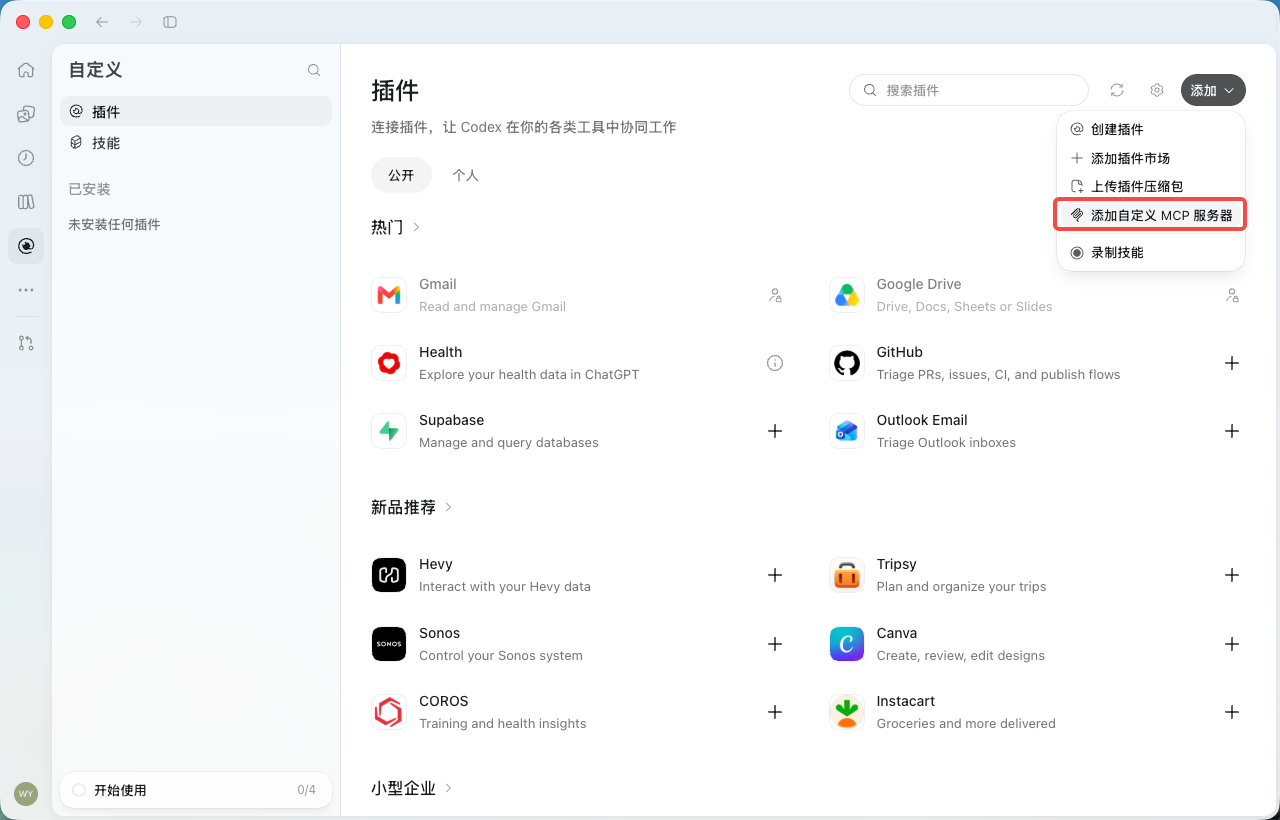
- 3Click "Add" in the top-right corner and choose "Add custom MCP server".点击右上角的「添加」,选择「添加自定义 MCP 服务器」。右上の「追加」をクリックし、「カスタム MCP サーバーを追加」を選択。Click "Add" in the top-right corner and choose "Add custom MCP server".Click "Add" in the top-right corner and choose "Add custom MCP server".
- 4Enter "FastMoss MCP" as the name and
https://mcp.fastmoss.com/mcpas the server URL, keep authentication as "OAuth", tick the risk acknowledgement, then click "Create as plugin". No API key is needed in the URL.名称填「FastMoss MCP」,服务器 URL 填https://mcp.fastmoss.com/mcp,身份验证保持「OAuth」,勾选「我已了解,并希望继续」,然后点击「创建为插件」。URL 里不用带 API Key。名前に「FastMoss MCP」、サーバー URL にhttps://mcp.fastmoss.com/mcpを入力し、認証は「OAuth」のまま、リスク確認にチェックを入れて「プラグインとして作成」をクリック。URL に API キーは不要です。Enter "FastMoss MCP" as the name andhttps://mcp.fastmoss.com/mcpas the server URL, keep authentication as "OAuth", tick the risk acknowledgement, then click "Create as plugin". No API key is needed in the URL.Enter "FastMoss MCP" as the name andhttps://mcp.fastmoss.com/mcpas the server URL, keep authentication as "OAuth", tick the risk acknowledgement, then click "Create as plugin". No API key is needed in the URL.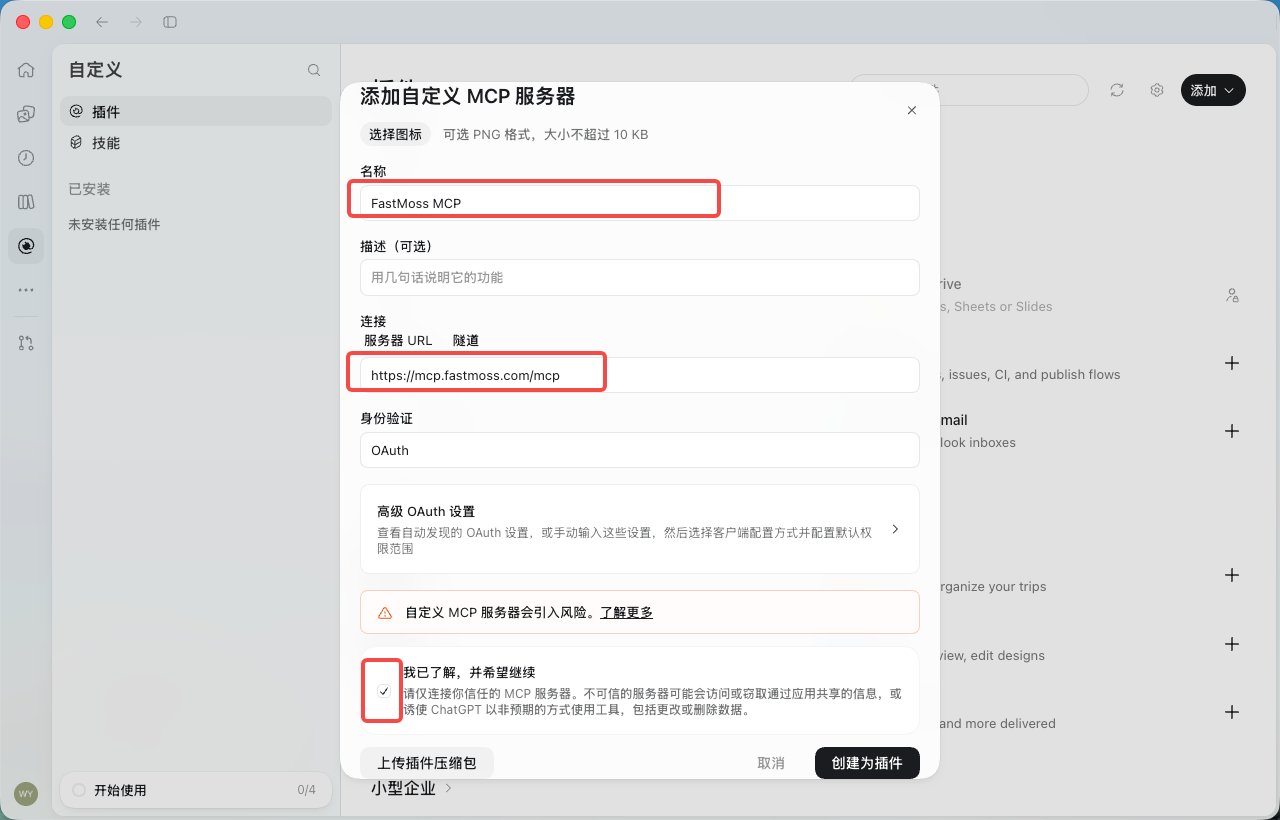
- 5In the dialog, click "Connect FastMoss MCP". Your browser opens the FastMoss authorization page.在弹窗中点击「连接 FastMoss MCP」,浏览器会打开 FastMoss 授权页。ダイアログで「FastMoss MCP に接続」をクリックすると、ブラウザで FastMoss の認可ページが開きます。In the dialog, click "Connect FastMoss MCP". Your browser opens the FastMoss authorization page.In the dialog, click "Connect FastMoss MCP". Your browser opens the FastMoss authorization page.
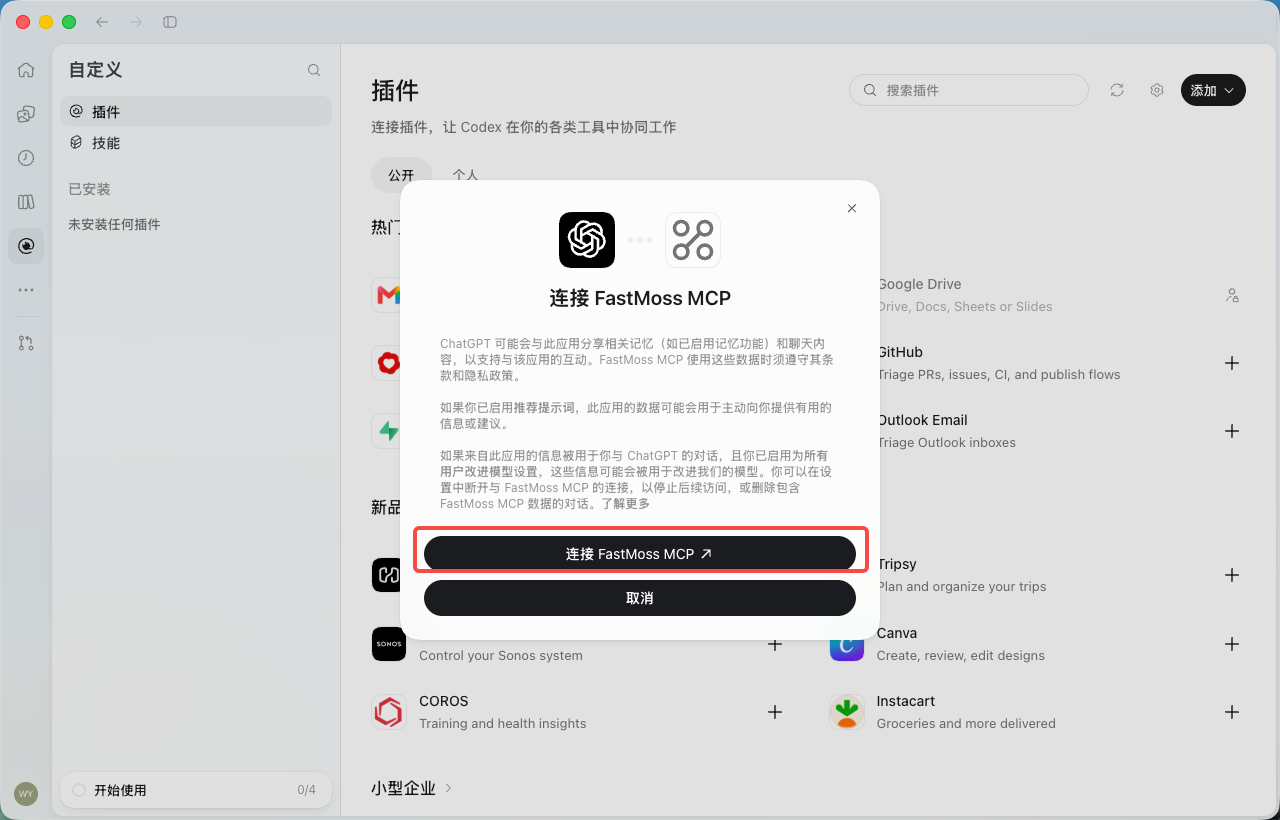
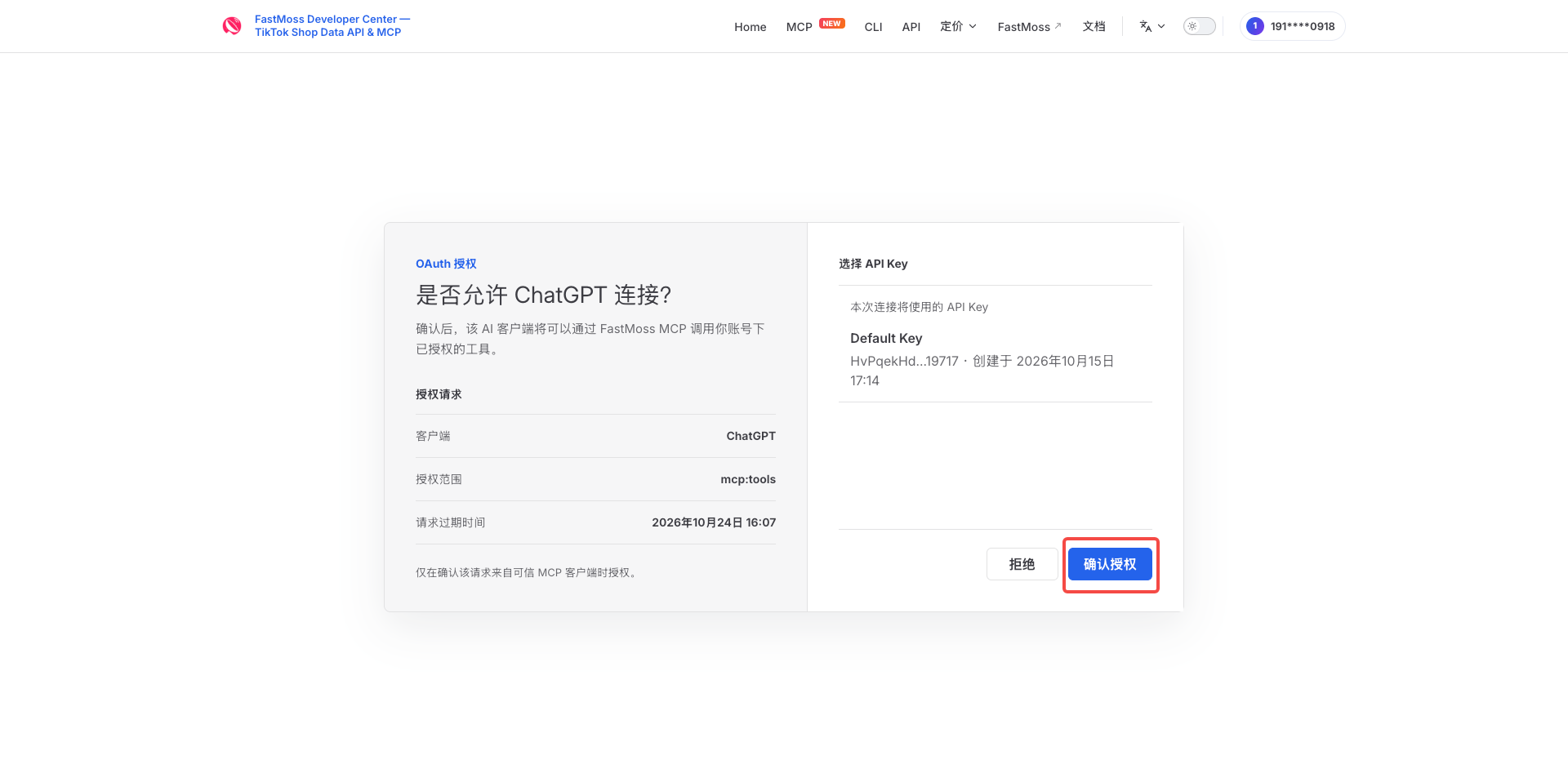
- 6Sign in first if prompted, check that the client is ChatGPT, then click "Allow".未登录会先跳转登录。确认客户端是 ChatGPT,点击「确认授权」。未ログインの場合は先にログイン。クライアントが ChatGPT であることを確認し、「Allow」をクリック。Sign in first if prompted, check that the client is ChatGPT, then click "Allow".Sign in first if prompted, check that the client is ChatGPT, then click "Allow".
- 7When the browser asks to open ChatGPT, click "Open ChatGPT".浏览器询问是否打开 ChatGPT 时,点击「打开ChatGPT」。ブラウザが ChatGPT を開くか確認したら「ChatGPT を開く」をクリック。When the browser asks to open ChatGPT, click "Open ChatGPT".When the browser asks to open ChatGPT, click "Open ChatGPT".
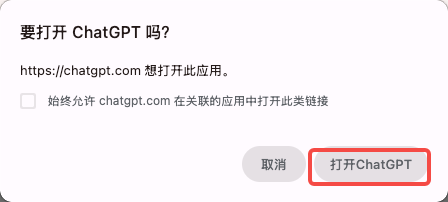
- 8Back in the app, "FastMoss MCP" appears under "Installed" — your FastMoss MCP is all set.回到应用,「已安装」下出现「FastMoss MCP」,FastMoss MCP 就配置完成了。アプリに戻り、「インストール済み」に「FastMoss MCP」が表示されれば設定完了です。Back in the app, "FastMoss MCP" appears under "Installed" — your FastMoss MCP is all set.Back in the app, "FastMoss MCP" appears under "Installed" — your FastMoss MCP is all set.
Verify your connection验证连接Verify your connectionVerifica tu conexiónVerifique sua conexãoVerifikasi koneksi Andaตรวจสอบการเชื่อมต่อของคุณXác minh kết nối của bạn
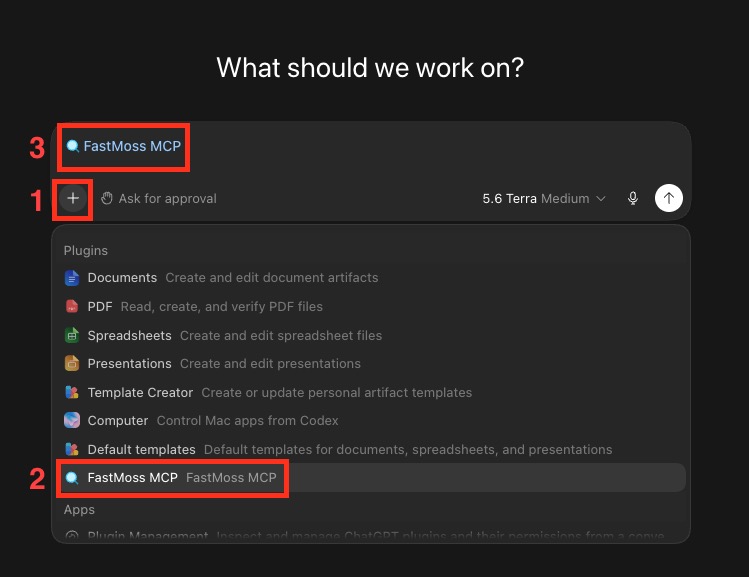
- Click the "+" button in the chat box.点击对话框中的「+」按钮。Click the "+" button in the chat box.Haz clic en el botón "+" del cuadro de chat.Clique no botão "+" na caixa de chat.Klik tombol "+" di kotak chat.คลิกปุ่ม "+" ในกล่องแชทNhấp vào nút "+" trong hộp chat.
- Choose "FastMoss MCP" from the Plugins list.在 Plugins 列表中选择「FastMoss MCP」。Choose "FastMoss MCP" from the Plugins list.Elige "FastMoss MCP" en la lista de Plugins.Escolha "FastMoss MCP" na lista de Plugins.Pilih "FastMoss MCP" dari daftar Plugins.เลือก "FastMoss MCP" จากรายชื่อ PluginsChọn "FastMoss MCP" từ danh sách Plugins.
- "FastMoss MCP" now shows above the input box — you're ready to run the prompt below.「FastMoss MCP」会出现在输入框上方——接着就可以执行下面的问题了。"FastMoss MCP" now shows above the input box — you're ready to run the prompt below."FastMoss MCP" ahora aparece sobre el cuadro de entrada: ya puedes ejecutar el prompt de abajo."FastMoss MCP" agora aparece acima da caixa de entrada — você está pronto para executar o prompt abaixo."FastMoss MCP" kini muncul di atas kotak input — Anda siap menjalankan prompt di bawah.ตอนนี้ "FastMoss MCP" แสดงอยู่เหนือกล่องกรอกข้อมูล — คุณพร้อมรันพรอมป์ด้านล่างแล้ว"FastMoss MCP" giờ hiện phía trên hộp nhập liệu — bạn đã sẵn sàng chạy prompt bên dưới.