Setup配置セットアップConfiguraciónConfiguraçãoSetupSetupSetup

Set up MCP配置 MCPMCP をセットアップConfigurar MCPConfigurar MCPSet up MCPSet up MCPSet up MCP

Choose a client, get a key, and verify the connection.选择客户端、获取 Key,并验证连接。クライアントを選択し、キーを取得して接続を確認します。Elige un cliente, obtén una clave y verifica la conexión.Escolha um cliente, obtenha uma chave e verifique a conexão.Choose a client, get a key, and verify the connection.Choose a client, get a key, and verify the connection.Choose a client, get a key, and verify the connection.

Setup配置セットアップConfiguraciónConfiguraçãoSetupSetupSetup

Claude Desktop setupClaude Desktop 配置Claude Desktop のセットアップConfiguración de Claude DesktopConfiguração do Claude DesktopClaude Desktop setupClaude Desktop setupClaude Desktop setup

Remote or local setup for Claude Desktop.Claude Desktop 的远程或本地配置。Claude Desktop のリモートまたはローカルセットアップ。Configuración remota o local para Claude Desktop.Configuração remota ou local para Claude Desktop.Remote or local setup for Claude Desktop.Remote or local setup for Claude Desktop.Remote or local setup for Claude Desktop.

Setup配置セットアップConfiguraciónConfiguraçãoSetupSetupSetup

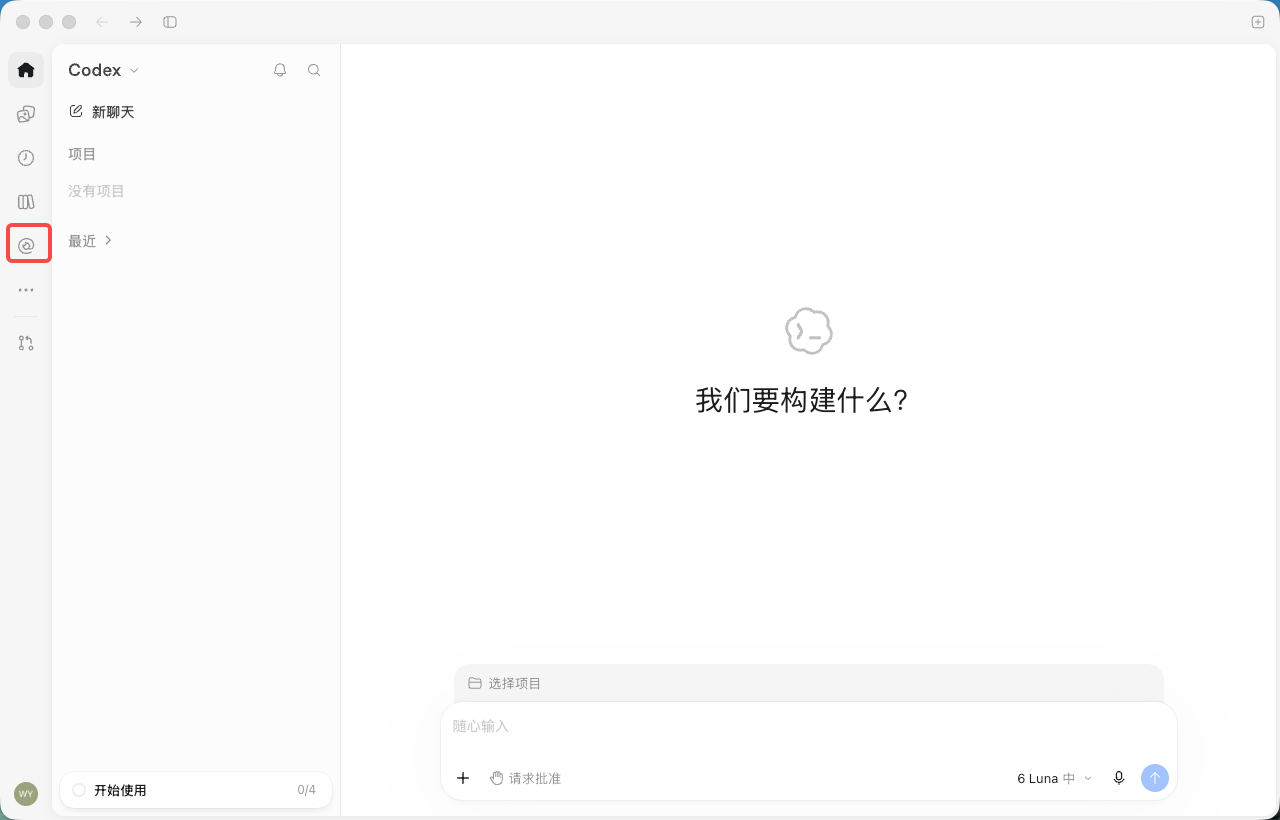
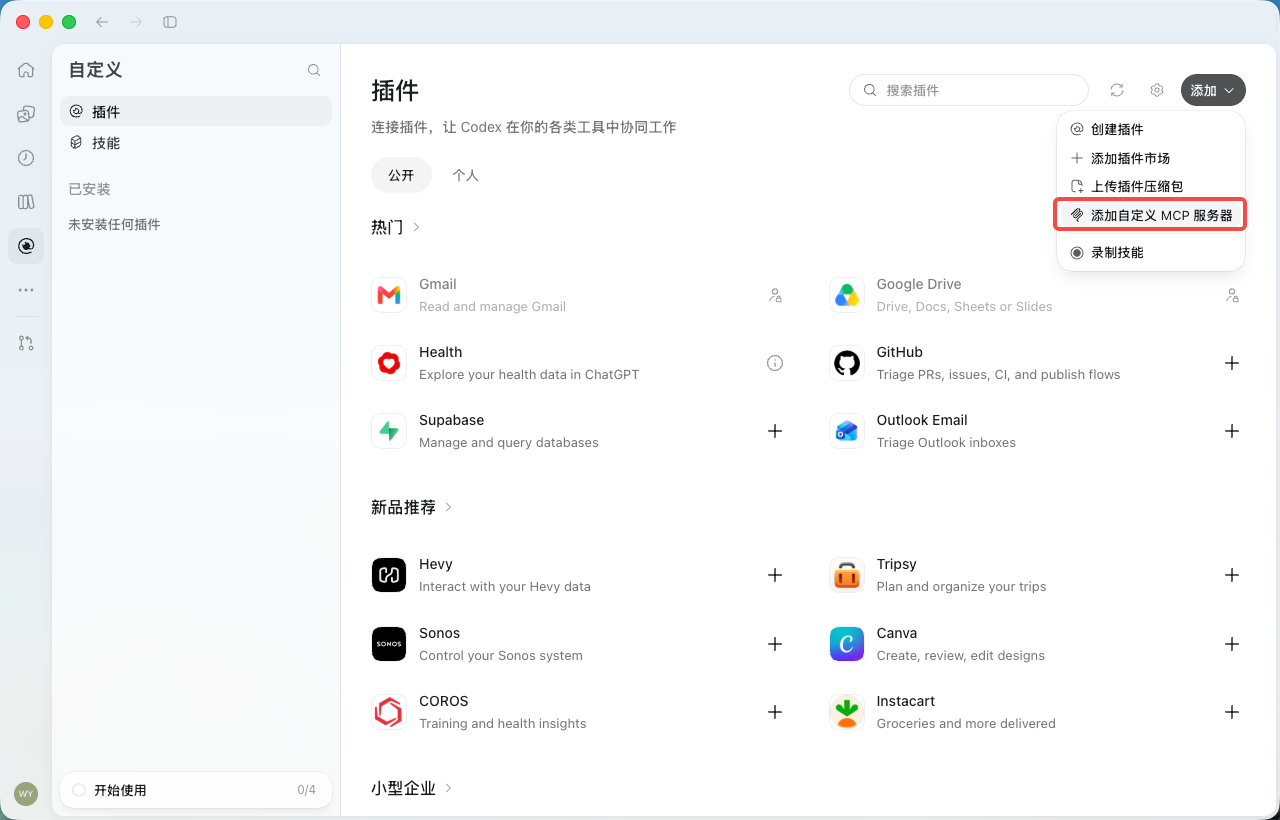
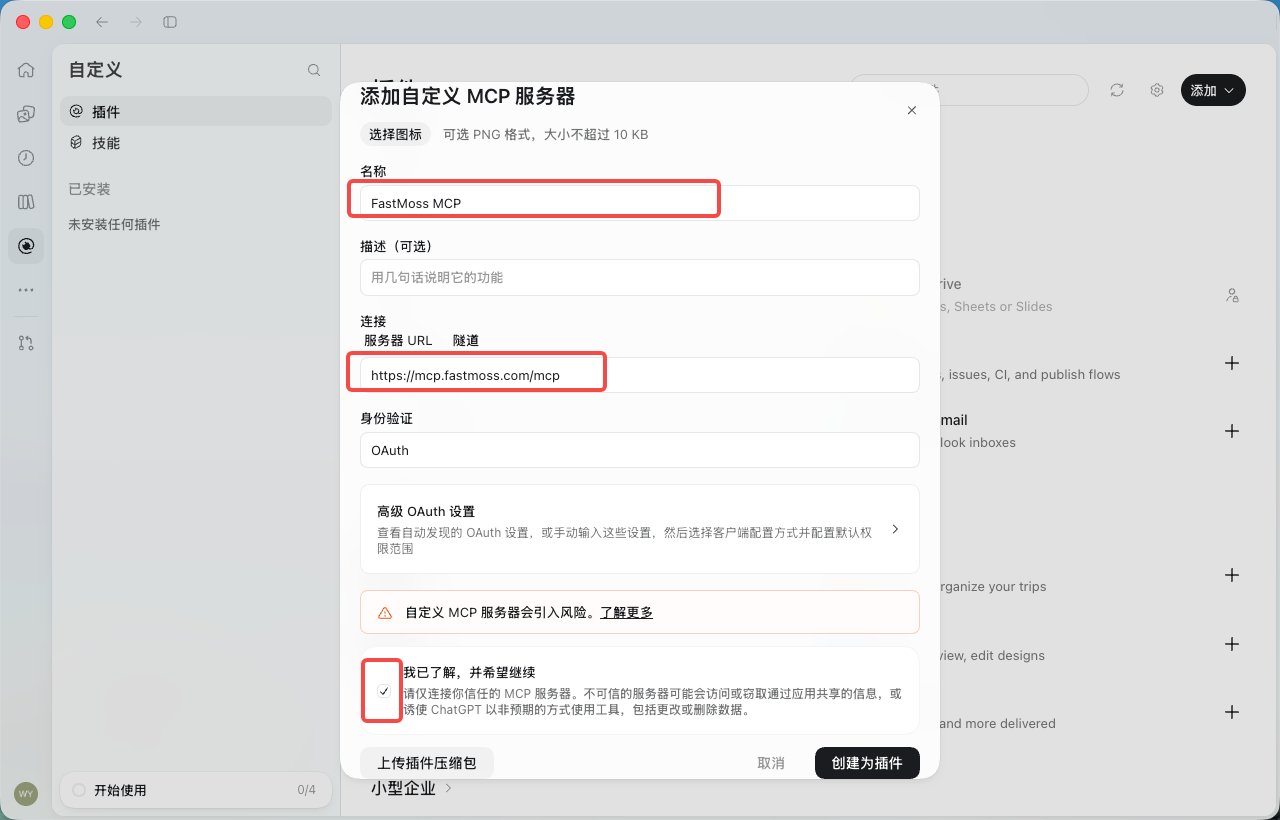
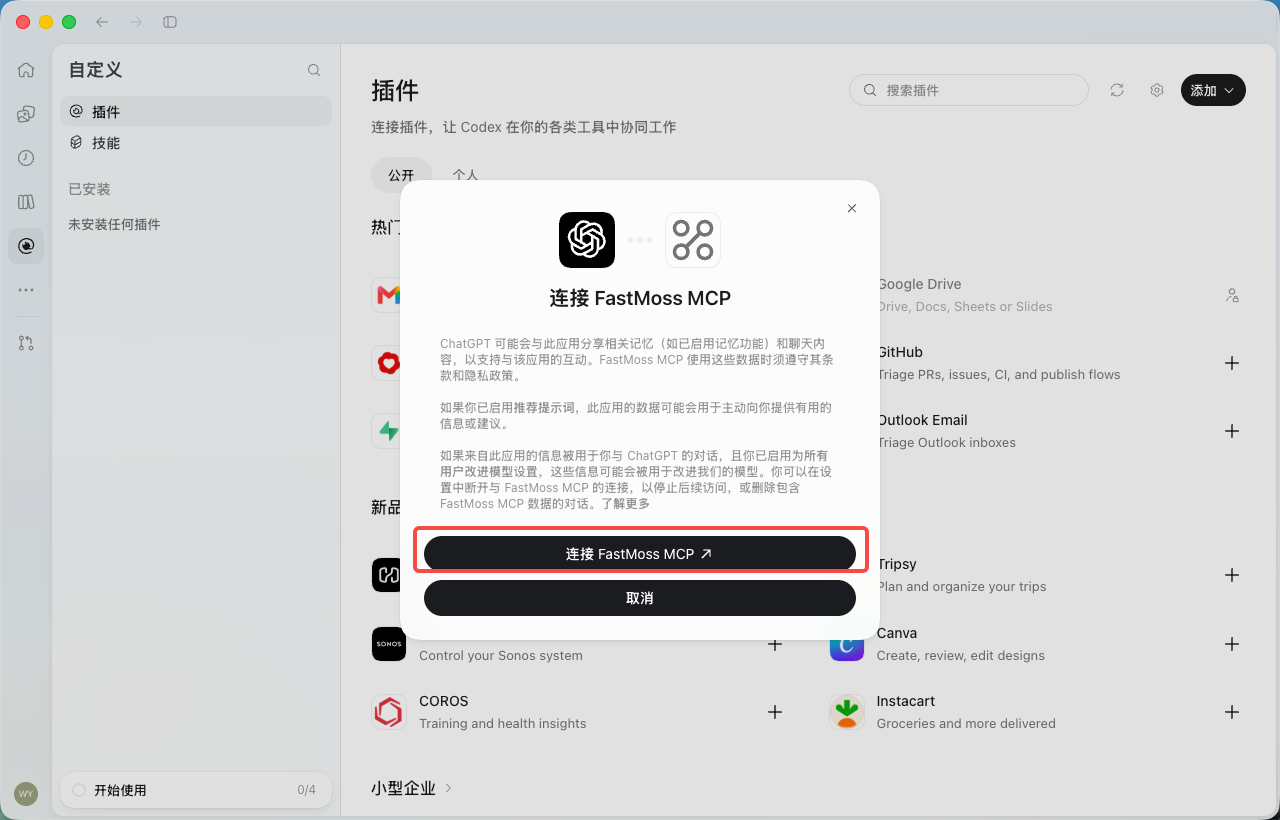
ChatGPT setupChatGPT 配置ChatGPT のセットアップConfiguración de ChatGPTConfiguração do ChatGPTChatGPT setupChatGPT setupChatGPT setup

Use FastMoss through supported custom apps or connectors.通过支持的自定义应用或连接器使用 FastMoss。サポートされているカスタムアプリまたはコネクタを介して FastMoss を使用。Usa FastMoss a través de aplicaciones personalizadas o conectores compatibles.Use o FastMoss por meio de aplicativos personalizados ou conectores compatíveis.Use FastMoss through supported custom apps or connectors.Use FastMoss through supported custom apps or connectors.Use FastMoss through supported custom apps or connectors.

Prompt提示词プロンプトPromptPromptPromptPromptPrompt

Build a seller-ready prompt生成可直接用的卖家提示词セラー向けプロンプトを作成Crea un prompt listo para vendedoresCrie um prompt pronto para vendedoresBuild a seller-ready promptBuild a seller-ready promptBuild a seller-ready prompt

Generate a prompt with time window, ranking, and fallback rules.生成带时间窗、排序与兜底规则的提示词。時間枠、ランキング、フォールバックルール付きのプロンプトを生成。Genera un prompt con ventana de tiempo, clasificación y reglas de respaldo.Gere um prompt com janela de tempo, classificação e regras de fallback.Generate a prompt with time window, ranking, and fallback rules.Generate a prompt with time window, ranking, and fallback rules.Generate a prompt with time window, ranking, and fallback rules.

Playbook玩法プレイブックPlaybookPlaybookPlaybookPlaybookPlaybook

Find and reach out to creators达人建联、找达人クリエイターを見つけて連絡Encuentra y contacta a creadoresEncontre e entre em contato com criadoresFind and reach out to creatorsFind and reach out to creatorsFind and reach out to creators

Source by selling power, judge fit, get outreach copy.按带货力找人、判断匹配、出建联文案。販売力でソースし、適合性を判断し、アウトリーチ文面を取得。Encuentra según poder de venta, evalúa el ajuste y obtén el mensaje de contacto.Selecione pelo poder de venda, avalie o encaixe e obtenha o texto de contato.Source by selling power, judge fit, get outreach copy.Source by selling power, judge fit, get outreach copy.Source by selling power, judge fit, get outreach copy.

Playbook玩法プレイブックPlaybookPlaybookPlaybookPlaybookPlaybook

Analyze a competitor shop分析竞品店铺競合ショップを分析Analiza una tienda competidoraAnalise uma loja concorrenteAnalyze a competitor shopAnalyze a competitor shopAnalyze a competitor shop

Shop GMV, channel mix, top products, and creator activity.店铺 GMV、渠道构成、热销商品与达人活跃度。ショップ GMV、チャネル構成、トップ商品、クリエイター活動。GMV de la tienda, mezcla de canales, productos top y actividad de creadores.GMV da loja, mix de canais, produtos principais e atividade de criadores.Shop GMV, channel mix, top products, and creator activity.Shop GMV, channel mix, top products, and creator activity.Shop GMV, channel mix, top products, and creator activity.

Skip to content
← Back to Docs Home← 返回文档首页← ドキュメントトップに戻る← Volver al inicio de Docs← Voltar ao início da documentação← Kembali ke Beranda Dokumentasi← กลับไปหน้าแรกของเอกสาร← Quay lại Trang chủ tài liệu

Set up MCP配置 MCPMCP をセットアップConfigurar MCPConfigurar MCPSetup MCPตั้งค่า MCPThiết lập MCP

Choose your AI app, get a FastMoss key, and verify the connection with a real TikTok Shop data question.选择你的 AI 应用,获取 FastMoss Key,再用一个真实的 TikTok Shop 数据问题验证连接。AI アプリを選択し、FastMoss キーを取得して、実際の TikTok ショップデータ質問で接続を確認します。Elige tu aplicación de IA, obtén una key de FastMoss y verifica la conexión con una pregunta real de datos de TikTok Shop.Escolha seu aplicativo de IA, obtenha uma chave FastMoss e verifique a conexão com uma pergunta real de dados da TikTok Shop.Pilih aplikasi AI Anda, dapatkan kunci FastMoss, dan verifikasi koneksi dengan pertanyaan data TikTok Shop yang nyata.เลือกแอป AI ของคุณ รับคีย์ FastMoss และตรวจสอบการเชื่อมต่อด้วยคำถามข้อมูล TikTok Shop จริงChọn ứng dụng AI của bạn, lấy khóa FastMoss và xác minh kết nối bằng một câu hỏi dữ liệu TikTok Shop thực tế.

1

Choose your AI选择你的 AIあなたの AI を選択Elige tu IAEscolha sua IAPilih AI Andaเลือก AI ของคุณChọn AI của bạn

Pick the AI client or model you use below and follow its config, remote or local.在下方选择你使用的 AI 客户端或模型,按它的远程或本地配置操作。使用している AI クライアントまたはモデルを選択し、リモートまたはローカルの設定に従ってください。Elige el cliente o modelo de IA que usas a continuación y sigue su configuración, remota o local.Escolha o cliente ou modelo de IA que você usa abaixo e siga a configuração dele, remota ou local.Pilih klien atau model AI yang Anda gunakan di bawah dan ikuti konfigurasinya, remote atau lokal.เลือกไคลเอนต์หรือโมเดล AI ที่คุณใช้ด้านล่าง แล้วทำตามการตั้งค่าของมัน ไม่ว่าจะระยะไกลหรือในเครื่องChọn ứng dụng hoặc mô hình AI bạn dùng bên dưới và làm theo cấu hình của nó, từ xa hoặc cục bộ.

2

Verify your connection验证连接Verify your connectionVerifica tu conexiónVerifique sua conexãoVerifikasi koneksi Andaตรวจสอบการเชื่อมต่อของคุณXác minh kết nối của bạn

Run one real business query to confirm that live FastMoss data is available.跑一个真实业务查询,确认能拿到 FastMoss 实时数据。実際のビジネスクエリを実行して、FastMoss のライブデータが利用可能であることを確認します。Ejecuta una consulta comercial real para confirmar que los datos en vivo de FastMoss están disponibles.Execute uma consulta comercial real para confirmar que os dados ao vivo da FastMoss estão disponíveis.Jalankan satu kueri bisnis nyata untuk mengonfirmasi bahwa data FastMoss langsung tersedia.รันคำค้นทางธุรกิจจริงหนึ่งรายการเพื่อยืนยันว่าข้อมูล FastMoss แบบสดพร้อมใช้งานChạy một truy vấn kinh doanh thực tế để xác nhận dữ liệu FastMoss trực tiếp đã sẵn sàng.

You need an API Key to start setting up. Haven't got a key yet? 开始配置前你需要一个 API Key。还没有 Key?Necesitas una API Key para comenzar. ¿Todavía no tienes una key? Você precisa de uma API Key para começar. Ainda não tem uma chave? Anda perlu API Key untuk mulai mengatur. Belum punya kunci?คุณต้องมี API Key เพื่อเริ่มตั้งค่า ยังไม่มีคีย์ใช่ไหม?Bạn cần một API Key để bắt đầu thiết lập. Chưa có khóa?Create your key here →在这里创建 Key →ここでキーを作成 →Crea tu key aquí →Crie sua chave aqui →Buat kunci Anda di sini →สร้างคีย์ของคุณที่นี่ →Tạo khóa của bạn tại đây →
Configure your client配置你的客户端クライアントを設定Configura tu clienteConfigure seu clienteKonfigurasikan klien Andaตั้งค่าไคลเอนต์ของคุณCấu hình ứng dụng của bạn

Claude/Claude Code

macOS · WindowsmacOS · WindowsmacOS · WindowsmacOS · WindowsmacOS · WindowsmacOS · WindowsmacOS · WindowsmacOS · Windows

Steps步骤StepsPasosEtapasLangkahขั้นตอนCác bước

  • 1Download Claude Desktop here.这里下载 Claude Desktop。Claude Desktop をダウンロードDownload Claude Desktop here.Download Claude Desktop here.
  • 2Open a new chat, and click "+".开启一个新对话,点击「+」。新しいチャットを開き、「+」をクリック。Open a new chat, and click "+".Open a new chat, and click "+".Setup screenshot 1
  • 3Click according to the number sequence shown in the image below.按照下图中的数字顺序依次点击。下図の番号順にクリック。Click according to the number sequence shown in the image below.Click according to the number sequence shown in the image below.Setup screenshot 1
  • 4In the "Name" column, name it "FastMoss MCP".在「Name」栏位中,命名为「FastMoss MCP」。「Name」欄に「FastMoss MCP」と入力。In the "Name" column, name it "FastMoss MCP".In the "Name" column, name it "FastMoss MCP".Setup screenshot 1
  • 5For the "Remote MCP server URL" column:关于「Remote MCP server URL」栏位:「Remote MCP server URL」欄について:For the "Remote MCP server URL" column:For the "Remote MCP server URL" column:
    • Step 1:步骤 1:Step 1:Step 1:Step 1:Step 1:Step 1:Paste the API key you just copied into the highlighted slot below, then click the copy button on the right to copy the complete URL.把你刚刚复制的 API Key 贴到下方高亮的空格里,然后点击右侧的复制按钮,复制出完整的 URL。コピーした API キーを下のハイライト欄に貼り付け、右側のコピーボタンで完全な URL をコピー。Paste the API key you just copied into the highlighted slot below, then click the copy button on the right to copy the complete URL.Paste the API key you just copied into the highlighted slot below, then click the copy button on the right to copy the complete URL.
      https://mcp.fastmoss.com/mcp?api_key=1
      2
    • Step 2:步骤 2:Step 2:Step 2:Step 2:Step 2:Step 2:Paste your own URL into the "Remote MCP server URL" column in Claude.把你自己的 URL 贴到 Claude 的「Remote MCP server URL」栏位中。自分の URL を Claude の「Remote MCP server URL」欄に貼り付け。Paste your own URL into the "Remote MCP server URL" column in Claude.Paste your own URL into the "Remote MCP server URL" column in Claude.Setup screenshot 1
  • 6Ignore both "Advanced settings" fields for now. Once your setup looks like the image below, click the "Add" button in the corner — your FastMoss MCP is all set.暂时忽略「Advanced settings」的两个栏位。确认你的设置与下图一致后,点击角落的「Add」按钮,FastMoss MCP 就配置完成了。「Advanced settings」は無視。下図の設定を確認したら、隅の「Add」をクリックして完了。Ignore both "Advanced settings" fields for now. Once your setup looks like the image below, click the "Add" button in the corner — your FastMoss MCP is all set.Ignore both "Advanced settings" fields for now. Once your setup looks like the image below, click the "Add" button in the corner — your FastMoss MCP is all set.Setup screenshot 1

Verify your connection验证连接Verify your connectionVerifica tu conexiónVerifique sua conexãoVerifikasi koneksi Andaตรวจสอบการเชื่อมต่อของคุณXác minh kết nối của bạn

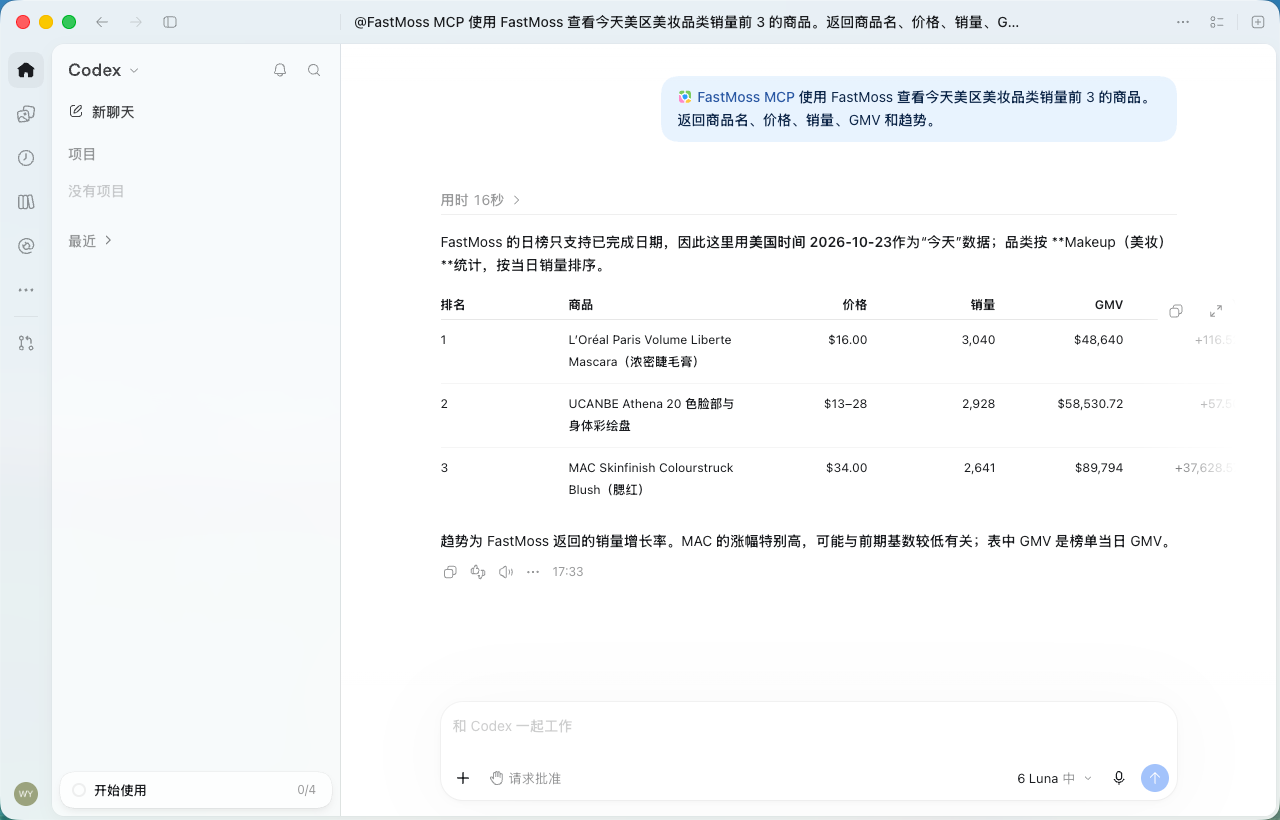
Paste this after setup. Live numbers back means you are connected.配置完成后粘贴这条。返回实时数字即表示已连接。セットアップ後にこれを貼り付けます。実際の数値が返ってくれば接続完了です。Pega esto después de la configuración. Si vuelven números en vivo, significa que estás conectado.Cole isto após a configuração. Números ao vivo de volta significam que você está conectado.Tempel ini setelah pengaturan. Angka langsung yang kembali berarti Anda terhubung.วางสิ่งนี้หลังตั้งค่า หากได้ตัวเลขจริงกลับมาแปลว่าคุณเชื่อมต่อแล้วDán đoạn này sau khi thiết lập. Nhận lại số liệu trực tiếp nghĩa là bạn đã kết nối.
Use FastMoss to show today's top 3 selling products in the US beauty category. Return product name, price, sales, GMV, and trend.使用 FastMoss 查看今天美区美妆品类销量前 3 的商品。返回商品名、价格、销量、GMV 和趋势。Use FastMoss to show today's top 3 selling products in the US beauty category. Return product name, price, sales, GMV, and trend.Usa FastMoss para mostrar los 3 productos más vendidos de hoy en la categoría de belleza de EE. UU. Devuelve nombre del producto, precio, ventas, GMV y tendencia.Use a FastMoss para mostrar os 3 produtos mais vendidos hoje na categoria de beleza dos EUA. Retorne nome do produto, preço, vendas, GMV e tendência.Gunakan FastMoss untuk menampilkan 3 produk terlaris hari ini di kategori kecantikan AS. Kembalikan nama produk, harga, penjualan, GMV, dan tren.ใช้ FastMoss แสดงสินค้าขายดี 3 อันดับแรกของวันนี้ในหมวดความงามของสหรัฐฯ คืนชื่อสินค้า ราคา ยอดขาย GMV และเทรนด์Dùng FastMoss để hiện 3 sản phẩm bán chạy nhất hôm nay trong danh mục làm đẹp tại Mỹ. Trả về tên sản phẩm, giá, doanh số, GMV và xu hướng.
Didn't get live numbers back? There are two ways to check your connection:上面的问题跑不出数据?有以下两种方法可以验证连接:Didn't get live numbers back? There are two ways to check your connection:¿No obtuviste números en vivo? Hay dos formas de verificar tu conexión:Não obteve números ao vivo? Há duas maneiras de verificar sua conexão:Tidak mendapat angka langsung? Ada dua cara untuk memeriksa koneksi Anda:ไม่ได้รับตัวเลขจริงกลับมา? มีสองวิธีตรวจสอบการเชื่อมต่อของคุณ:Không nhận lại số liệu trực tiếp? Có hai cách để kiểm tra kết nối của bạn:
  1. Make sure your FastMoss MCP is on.确认你的 FastMoss MCP 已开启。Make sure your FastMoss MCP is on.Asegúrate de que tu FastMoss MCP esté activado.Certifique-se de que seu FastMoss MCP esteja ativado.Pastikan FastMoss MCP Anda aktif.ตรวจสอบให้แน่ใจว่า FastMoss MCP ของคุณเปิดอยู่Đảm bảo FastMoss MCP của bạn đang bật.Claude Desktop Connectors menu — the FastMoss MCP toggle is switched on
  2. Click "Manage connectors", select FastMoss MCP, and set the tool permissions to "Always allow".点击「Manage connectors」,选择 FastMoss MCP,并将工具权限设为「Always allow」。Click "Manage connectors", select FastMoss MCP, and set the tool permissions to "Always allow".Haz clic en "Manage connectors", selecciona FastMoss MCP y establece los permisos de la herramienta en "Always allow".Clique em "Manage connectors", selecione FastMoss MCP e defina as permissões da ferramenta como "Always allow".Klik "Manage connectors", pilih FastMoss MCP, dan atur izin alat ke "Always allow".คลิก "Manage connectors" เลือก FastMoss MCP แล้วตั้งสิทธิ์เครื่องมือเป็น "Always allow"Nhấp "Manage connectors", chọn FastMoss MCP và đặt quyền công cụ thành "Always allow".Claude settings — FastMoss MCP tool permissions set to Always allow

Make MCP even better让 MCP 更强MCP をさらに活用するHaz que MCP sea aún mejorTorne o MCP ainda melhorJadikan MCP lebih baik lagiทำให้ MCP ดีกว่าเดิมLàm cho MCP tốt hơn nữa

SKILLS
MCP gives your AI access to FastMoss data. Skills go further — pre-built instruction sets that teach your AI how to think like a seller.MCP 让你的 AI 能调用 FastMoss 数据;Skills 更进一步——预置的指令集,教你的 AI 像卖家一样思考。MCP はあなたの AI に FastMoss データへのアクセスを提供します。Skills はさらに進んで、あなたの AI にセラーのように考える方法を教える事前構築済みの命令セットです。MCP le da a tu IA acceso a los datos de FastMoss. Skills va más allá: conjuntos de instrucciones preconfigurados que enseñan a tu IA a pensar como un vendedor.O MCP dá à sua IA acesso aos dados da FastMoss. As Skills vão além: conjuntos de instruções prontos que ensinam sua IA a pensar como um vendedor.MCP memberi AI Anda akses ke data FastMoss. Skills melangkah lebih jauh — kumpulan instruksi siap pakai yang mengajari AI Anda berpikir seperti penjual.MCP ทำให้ AI ของคุณเข้าถึงข้อมูล FastMoss ได้ Skills ไปไกลกว่านั้น — ชุดคำสั่งสำเร็จรูปที่สอนให้ AI ของคุณคิดเหมือนนักขายMCP cho AI của bạn truy cập dữ liệu FastMoss. Skills đi xa hơn — các bộ chỉ dẫn dựng sẵn dạy AI của bạn tư duy như một người bán.
5 skills across5 个技能,覆盖5 skills across5 skills en5 skills em5 skills di5 skills ใน5 skills trên4 roles4 类角色4 roles4 roles4 funções4 peran4 บทบาท4 vai trò
🔍
Product Research选品研究Product ResearchInvestigación de productosPesquisa de produtosRiset Produkการวิจัยสินค้าNghiên cứu sản phẩm

Identify winning products and benchmark against competitors using structured ranking and trend logic.用结构化的排序与趋势逻辑找出爆品,并与竞品做对标。Identify winning products and benchmark against competitors using structured ranking and trend logic.Identifica productos ganadores y compáralos con la competencia usando lógica estructurada de ranking y tendencias.Identifique produtos vencedores e compare com concorrentes usando lógica estruturada de classificação e tendências.Identifikasi produk pemenang dan tolok ukur terhadap pesaing menggunakan logika peringkat dan tren yang terstruktur.ระบุสินค้าที่ชนะและเทียบเกณฑ์กับคู่แข่งโดยใช้ตรรกะการจัดอันดับและเทรนด์ที่เป็นระบบXác định sản phẩm thắng và so chuẩn với đối thủ bằng logic xếp hạng và xu hướng có cấu trúc.

2 skills2 个技能2 skills2 skills2 skills2 skills2 skills2 skills
🤝
Creator Outreach达人建联Creator OutreachDivulgación de creadoresProspecção de criadoresOutreach Kreatorการเข้าถึงครีเอเตอร์Tiếp cận nhà sáng tạo

Find and evaluate creators by niche, GMV potential, and audience fit — ready for collab outreach.按垂类、GMV 潜力与受众匹配度筛选并评估达人,直接用于合作建联。Find and evaluate creators by niche, GMV potential, and audience fit — ready for collab outreach.Encuentra y evalúa creadores por nicho, potencial de GMV y ajuste de audiencia, listos para la colaboración.Encontre e avalie criadores por nicho, potencial de GMV e adequação de público, prontos para colaboração.Temukan dan evaluasi kreator berdasarkan niche, potensi GMV, dan kecocokan audiens — siap untuk outreach kolaborasi.ค้นหาและประเมินครีเอเตอร์ตามตลาดเฉพาะ ศักยภาพ GMV และความเข้ากับกลุ่มผู้ชม — พร้อมสำหรับการติดต่อคอลแลบTìm và đánh giá nhà sáng tạo theo ngách, tiềm năng GMV và độ hợp khán giả — sẵn sàng để tiếp cận hợp tác.

1 skill1 个技能1 skill1 skill1 skill1 skill1 skill1 skill
🏪
Shop Diagnostics店铺诊断Shop DiagnosticsDiagnóstico de tiendasDiagnóstico de lojasDiagnostik Tokoการวินิจฉัยร้านค้าChẩn đoán cửa hàng

Audit a shop's product mix, pricing gaps, and creator strategy to surface quick wins.审视店铺的商品结构、定价缺口与达人策略,找出可快速见效的机会点。Audit a shop's product mix, pricing gaps, and creator strategy to surface quick wins.Audita el mix de productos, los huecos de precios y la estrategia de creadores de una tienda para encontrar victorias rápidas.Audite o mix de produtos, lacunas de preço e estratégia de criadores de uma loja para encontrar ganhos rápidos.Audit kombinasi produk toko, celah harga, dan strategi kreator untuk menemukan kemenangan cepat.ตรวจสอบส่วนผสมสินค้า ช่องว่างราคา และกลยุทธ์ครีเอเตอร์ของร้านค้า เพื่อเผยชัยชนะที่ทำได้เร็วKiểm toán danh mục sản phẩm, khoảng trống giá và chiến lược nhà sáng tạo của cửa hàng để tìm các thắng lợi nhanh.

1 skill1 个技能1 skill1 skill1 skill1 skill1 skill1 skill
✍️
Content Assistant内容助手Content AssistantAsistente de contenidoAssistente de conteúdoAsisten Kontenผู้ช่วยด้านคอนเทนต์Trợ lý nội dung

Generate scripts, hooks, and product copy grounded in real sales and engagement data.基于真实销售与互动数据,生成脚本、开场钩子与商品文案。Generate scripts, hooks, and product copy grounded in real sales and engagement data.Genera guiones, hooks y copy de producto basados en datos reales de ventas y engagement.Gere roteiros, hooks e textos de produto com base em dados reais de vendas e engajamento.Buat skrip, hook, dan copy produk berdasarkan data penjualan dan engagement yang nyata.สร้างสคริปต์ ฮุก และข้อความสินค้าโดยอิงจากข้อมูลยอดขายและเอนเกจเมนต์จริงTạo kịch bản, hook và nội dung sản phẩm dựa trên dữ liệu doanh số và tương tác thực tế.

1 skill1 个技能1 skill1 skill1 skill1 skill1 skill1 skill
Copy and paste to Claude Code, Codex, Cursor and other AI agents to download skills复制并粘贴到 Claude Code、Codex、Cursor 等 AI 工具中以下载技能Copy and paste to Claude Code, Codex, Cursor and other AI agents to download skillsCopia y pega en Claude Code, Codex, Cursor y otros agentes de IA para descargar skillsCopie e cole no Claude Code, Codex, Cursor e outros agentes de IA para baixar skillsSalin dan tempel ke Claude Code, Codex, Cursor, dan agen AI lainnya untuk mengunduh skillsคัดลอกและวางลงใน Claude Code, Codex, Cursor และเอเจนต์ AI อื่น ๆ เพื่อดาวน์โหลด skillsSao chép và dán vào Claude Code, Codex, Cursor cùng các agent AI khác để tải skills
npx skills add FastMoss/fastmoss-skills
Browse the source and contribute on 浏览源码并贡献 Browse the source and contribute on Explora el código fuente y contribuye en Explore o código-fonte e contribua em Jelajahi sumber dan berkontribusi diเรียกดูซอร์สโค้ดและร่วมพัฒนาได้ที่Xem mã nguồn và đóng góp trênVisit GitHub →访问 GitHub →Visit GitHub →Visita GitHub →Visite o GitHub →Kunjungi GitHub →ไปที่ GitHub →Truy cập GitHub →

Community & support社区与支持コミュニティとサポートComunidad y soporteComunidade e suporteKomunitas & dukunganชุมชนและการสนับสนุนCộng đồng & hỗ trợ

Got stuck? Reach us on Discord, our Lark group, or by email — whichever works for you.遇到问题?通过 Discord、飞书群或邮件联系我们,哪种方便用哪种。行き詰まりましたか?Discord、Larks グループ、またはメールでお問い合わせください。¿Te quedaste atascado? Contáctanos por Discord, nuestro grupo de Lark o por correo — lo que te funcione.Empacou? Fale conosco pelo Discord, nosso grupo no Lark ou por e-mail — o que funcionar para você.Bingung? Hubungi kami di Discord, grup Lark kami, atau lewat email — mana pun yang cocok untuk Anda.ติดปัญหาหรือ? ติดต่อเราได้ทาง Discord กลุ่ม Lark ของเรา หรือทางอีเมล — เลือกวิธีที่สะดวกสำหรับคุณGặp khó khăn? Hãy liên hệ chúng tôi trên Discord, nhóm Lark của chúng tôi, hoặc qua email — bất cứ cách nào thuận tiện cho bạn.
Email support邮件联系メールサポートSoporte por correoSuporte por e-mailDukungan emailการสนับสนุนทางอีเมลHỗ trợ qua email
Send us an email — we reply within 24 hours.给我们发邮件,24 小时内回复。メールをお送りください。24 時間以内に返信します。Envíanos un correo — respondemos en menos de 24 horas.Envie-nos um e-mail — respondemos em até 24 horas.Kirim email kepada kami — kami membalas dalam 24 jam.ส่งอีเมลถึงเรา — เราตอบกลับภายใน 24 ชั่วโมงGửi email cho chúng tôi — chúng tôi phản hồi trong vòng 24 giờ.