Setup配置セットアップConfiguraciónConfiguraçãoSetupSetupSetup

Set up MCP配置 MCPMCP をセットアップConfigurar MCPConfigurar MCPSet up MCPSet up MCPSet up MCP

Choose a client, get a key, and verify the connection.选择客户端、获取 Key,并验证连接。クライアントを選択し、キーを取得して接続を確認します。Elige un cliente, obtén una clave y verifica la conexión.Escolha um cliente, obtenha uma chave e verifique a conexão.Choose a client, get a key, and verify the connection.Choose a client, get a key, and verify the connection.Choose a client, get a key, and verify the connection.

Setup配置セットアップConfiguraciónConfiguraçãoSetupSetupSetup

Claude Desktop setupClaude Desktop 配置Claude Desktop のセットアップConfiguración de Claude DesktopConfiguração do Claude DesktopClaude Desktop setupClaude Desktop setupClaude Desktop setup

Remote or local setup for Claude Desktop.Claude Desktop 的远程或本地配置。Claude Desktop のリモートまたはローカルセットアップ。Configuración remota o local para Claude Desktop.Configuração remota ou local para Claude Desktop.Remote or local setup for Claude Desktop.Remote or local setup for Claude Desktop.Remote or local setup for Claude Desktop.

Setup配置セットアップConfiguraciónConfiguraçãoSetupSetupSetup

ChatGPT setupChatGPT 配置ChatGPT のセットアップConfiguración de ChatGPTConfiguração do ChatGPTChatGPT setupChatGPT setupChatGPT setup

Use FastMoss through supported custom apps or connectors.通过支持的自定义应用或连接器使用 FastMoss。サポートされているカスタムアプリまたはコネクタを介して FastMoss を使用。Usa FastMoss a través de aplicaciones personalizadas o conectores compatibles.Use o FastMoss por meio de aplicativos personalizados ou conectores compatíveis.Use FastMoss through supported custom apps or connectors.Use FastMoss through supported custom apps or connectors.Use FastMoss through supported custom apps or connectors.

Prompt提示词プロンプトPromptPromptPromptPromptPrompt

Build a seller-ready prompt生成可直接用的卖家提示词セラー向けプロンプトを作成Crea un prompt listo para vendedoresCrie um prompt pronto para vendedoresBuild a seller-ready promptBuild a seller-ready promptBuild a seller-ready prompt

Generate a prompt with time window, ranking, and fallback rules.生成带时间窗、排序与兜底规则的提示词。時間枠、ランキング、フォールバックルール付きのプロンプトを生成。Genera un prompt con ventana de tiempo, clasificación y reglas de respaldo.Gere um prompt com janela de tempo, classificação e regras de fallback.Generate a prompt with time window, ranking, and fallback rules.Generate a prompt with time window, ranking, and fallback rules.Generate a prompt with time window, ranking, and fallback rules.

Playbook玩法プレイブックPlaybookPlaybookPlaybookPlaybookPlaybook

Find and reach out to creators达人建联、找达人クリエイターを見つけて連絡Encuentra y contacta a creadoresEncontre e entre em contato com criadoresFind and reach out to creatorsFind and reach out to creatorsFind and reach out to creators

Source by selling power, judge fit, get outreach copy.按带货力找人、判断匹配、出建联文案。販売力でソースし、適合性を判断し、アウトリーチ文面を取得。Encuentra según poder de venta, evalúa el ajuste y obtén el mensaje de contacto.Selecione pelo poder de venda, avalie o encaixe e obtenha o texto de contato.Source by selling power, judge fit, get outreach copy.Source by selling power, judge fit, get outreach copy.Source by selling power, judge fit, get outreach copy.

Playbook玩法プレイブックPlaybookPlaybookPlaybookPlaybookPlaybook

Analyze a competitor shop分析竞品店铺競合ショップを分析Analiza una tienda competidoraAnalise uma loja concorrenteAnalyze a competitor shopAnalyze a competitor shopAnalyze a competitor shop

Shop GMV, channel mix, top products, and creator activity.店铺 GMV、渠道构成、热销商品与达人活跃度。ショップ GMV、チャネル構成、トップ商品、クリエイター活動。GMV de la tienda, mezcla de canales, productos top y actividad de creadores.GMV da loja, mix de canais, produtos principais e atividade de criadores.Shop GMV, channel mix, top products, and creator activity.Shop GMV, channel mix, top products, and creator activity.Shop GMV, channel mix, top products, and creator activity.

Skip to content
← Back to Docs Home← 返回文档首页← ドキュメントトップに戻る← Volver al inicio de Docs← Voltar ao início da documentação← Kembali ke Beranda Dokumentasi← กลับไปหน้าแรกของเอกสาร← Quay lại Trang chủ tài liệu

Set up MCP配置 MCPMCP をセットアップConfigurar MCPConfigurar MCPSetup MCPตั้งค่า MCPThiết lập MCP

Choose your AI app, get a FastMoss key, and verify the connection with a real TikTok Shop data question.选择你的 AI 应用,获取 FastMoss Key,再用一个真实的 TikTok Shop 数据问题验证连接。AI アプリを選択し、FastMoss キーを取得して、実際の TikTok ショップデータ質問で接続を確認します。Elige tu aplicación de IA, obtén una key de FastMoss y verifica la conexión con una pregunta real de datos de TikTok Shop.Escolha seu aplicativo de IA, obtenha uma chave FastMoss e verifique a conexão com uma pergunta real de dados da TikTok Shop.Pilih aplikasi AI Anda, dapatkan kunci FastMoss, dan verifikasi koneksi dengan pertanyaan data TikTok Shop yang nyata.เลือกแอป AI ของคุณ รับคีย์ FastMoss และตรวจสอบการเชื่อมต่อด้วยคำถามข้อมูล TikTok Shop จริงChọn ứng dụng AI của bạn, lấy khóa FastMoss và xác minh kết nối bằng một câu hỏi dữ liệu TikTok Shop thực tế.

1

Choose your AI选择你的 AIあなたの AI を選択Elige tu IAEscolha sua IAPilih AI Andaเลือก AI ของคุณChọn AI của bạn

Pick the AI client or model you use below and follow its config, remote or local.在下方选择你使用的 AI 客户端或模型,按它的远程或本地配置操作。使用している AI クライアントまたはモデルを選択し、リモートまたはローカルの設定に従ってください。Elige el cliente o modelo de IA que usas a continuación y sigue su configuración, remota o local.Escolha o cliente ou modelo de IA que você usa abaixo e siga a configuração dele, remota ou local.Pilih klien atau model AI yang Anda gunakan di bawah dan ikuti konfigurasinya, remote atau lokal.เลือกไคลเอนต์หรือโมเดล AI ที่คุณใช้ด้านล่าง แล้วทำตามการตั้งค่าของมัน ไม่ว่าจะระยะไกลหรือในเครื่องChọn ứng dụng hoặc mô hình AI bạn dùng bên dưới và làm theo cấu hình của nó, từ xa hoặc cục bộ.

2

Verify your connection验证连接Verify your connectionVerifica tu conexiónVerifique sua conexãoVerifikasi koneksi Andaตรวจสอบการเชื่อมต่อของคุณXác minh kết nối của bạn

Run one real business query to confirm that live FastMoss data is available.跑一个真实业务查询,确认能拿到 FastMoss 实时数据。実際のビジネスクエリを実行して、FastMoss のライブデータが利用可能であることを確認します。Ejecuta una consulta comercial real para confirmar que los datos en vivo de FastMoss están disponibles.Execute uma consulta comercial real para confirmar que os dados ao vivo da FastMoss estão disponíveis.Jalankan satu kueri bisnis nyata untuk mengonfirmasi bahwa data FastMoss langsung tersedia.รันคำค้นทางธุรกิจจริงหนึ่งรายการเพื่อยืนยันว่าข้อมูล FastMoss แบบสดพร้อมใช้งานChạy một truy vấn kinh doanh thực tế để xác nhận dữ liệu FastMoss trực tiếp đã sẵn sàng.

Configure your client配置你的客户端クライアントを設定Configura tu clienteConfigure seu clienteKonfigurasikan klien Andaตั้งค่าไคลเอนต์ของคุณCấu hình ứng dụng của bạn

ChatGPT / Codex

Desktop app · macOS · Windows桌面应用 · macOS · Windowsデスクトップアプリ · macOS · WindowsDesktop app · macOS · WindowsDesktop app · macOS · WindowsDesktop app · macOS · WindowsDesktop app · macOS · WindowsDesktop app · macOS · Windows

Steps步骤StepsPasosEtapasLangkahขั้นตอนCác bước

  • 1Download the ChatGPT desktop app here.从这里下载 ChatGPT 桌面版。ChatGPT デスクトップアプリをダウンロード。Download the ChatGPT desktop app here.Download the ChatGPT desktop app here.
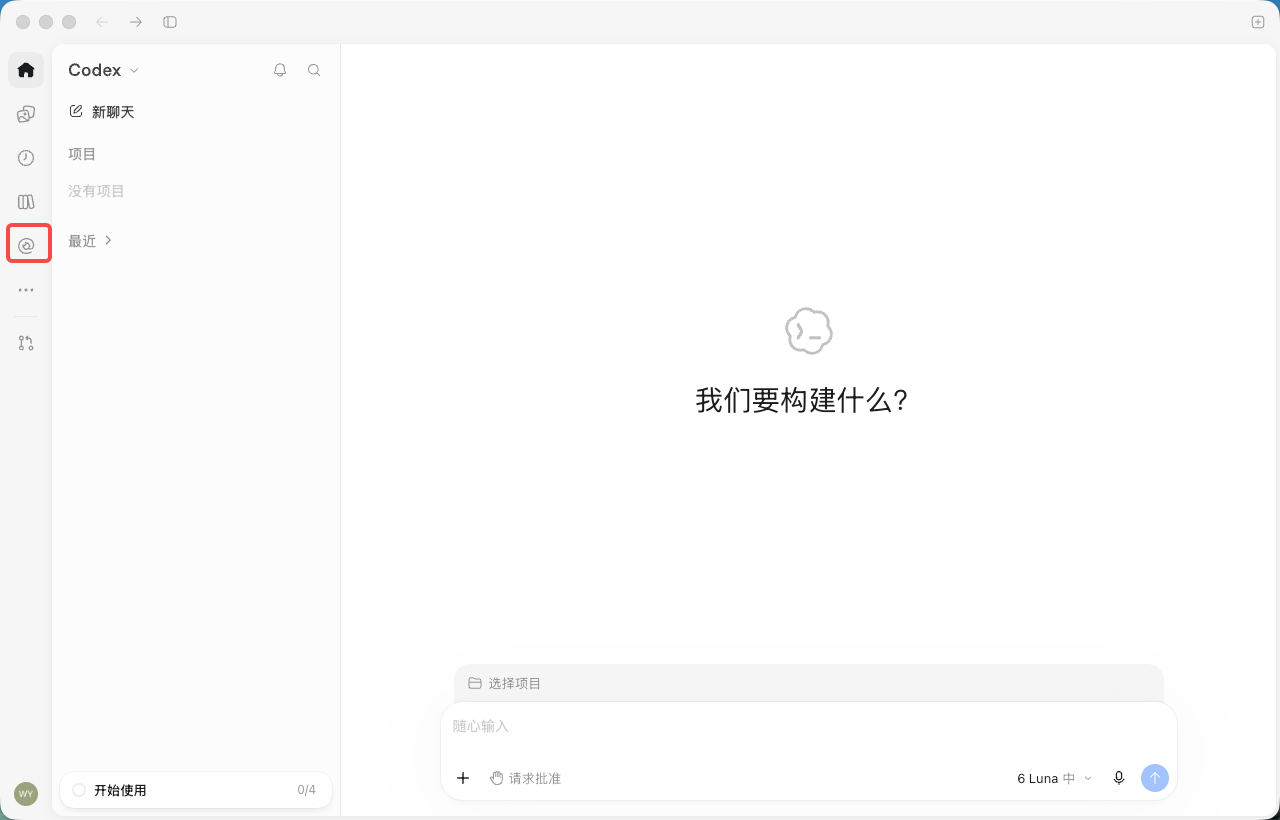
  • 2Open the app and click the "Plugins" icon in the left sidebar. The entry is the same in ChatGPT and Codex.打开应用,点击左侧边栏的「插件」图标。ChatGPT 与 Codex 入口相同。アプリを開き、左サイドバーの「プラグイン」アイコンをクリック。ChatGPT と Codex で同じ入口です。Open the app and click the "Plugins" icon in the left sidebar. The entry is the same in ChatGPT and Codex.Open the app and click the "Plugins" icon in the left sidebar. The entry is the same in ChatGPT and Codex.Setup screenshot 1
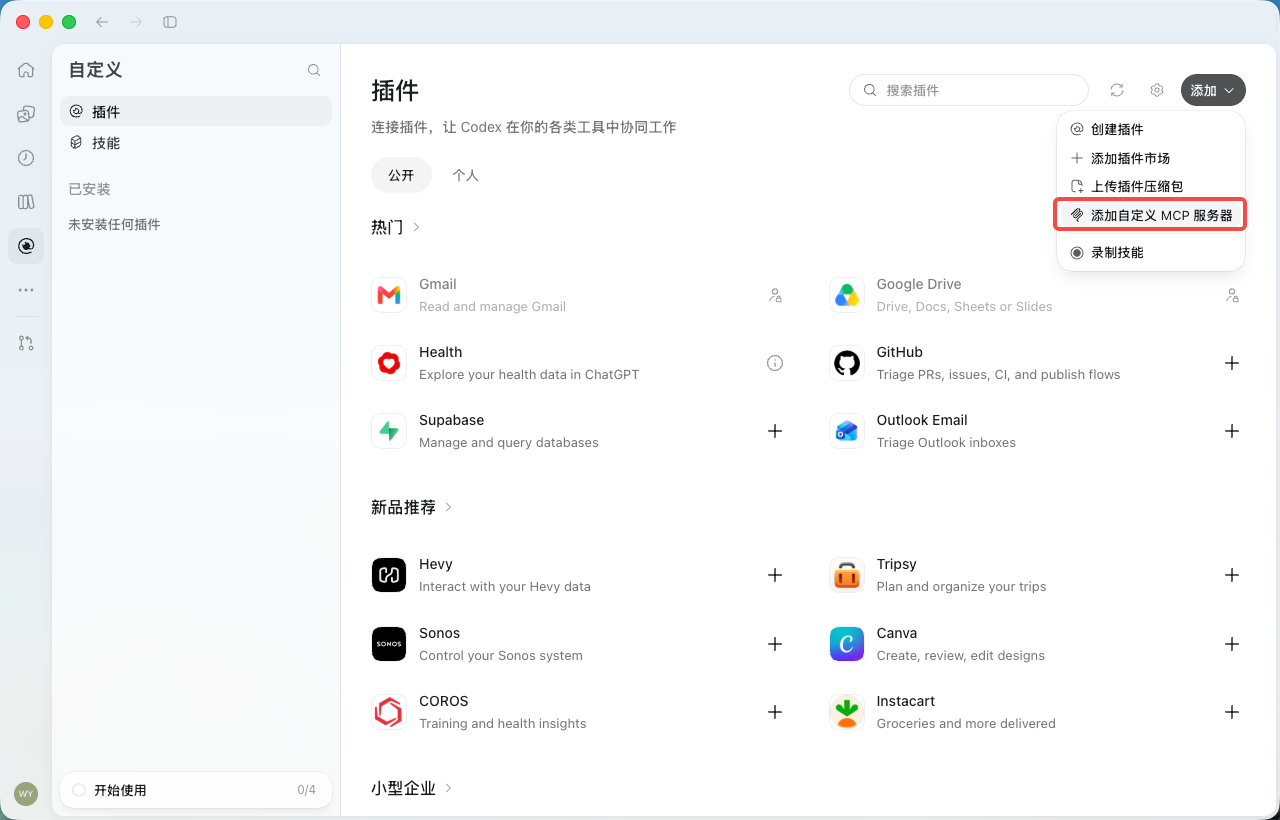
  • 3Click "Add" in the top-right corner and choose "Add custom MCP server".点击右上角的「添加」,选择「添加自定义 MCP 服务器」。右上の「追加」をクリックし、「カスタム MCP サーバーを追加」を選択。Click "Add" in the top-right corner and choose "Add custom MCP server".Click "Add" in the top-right corner and choose "Add custom MCP server".Setup screenshot 1
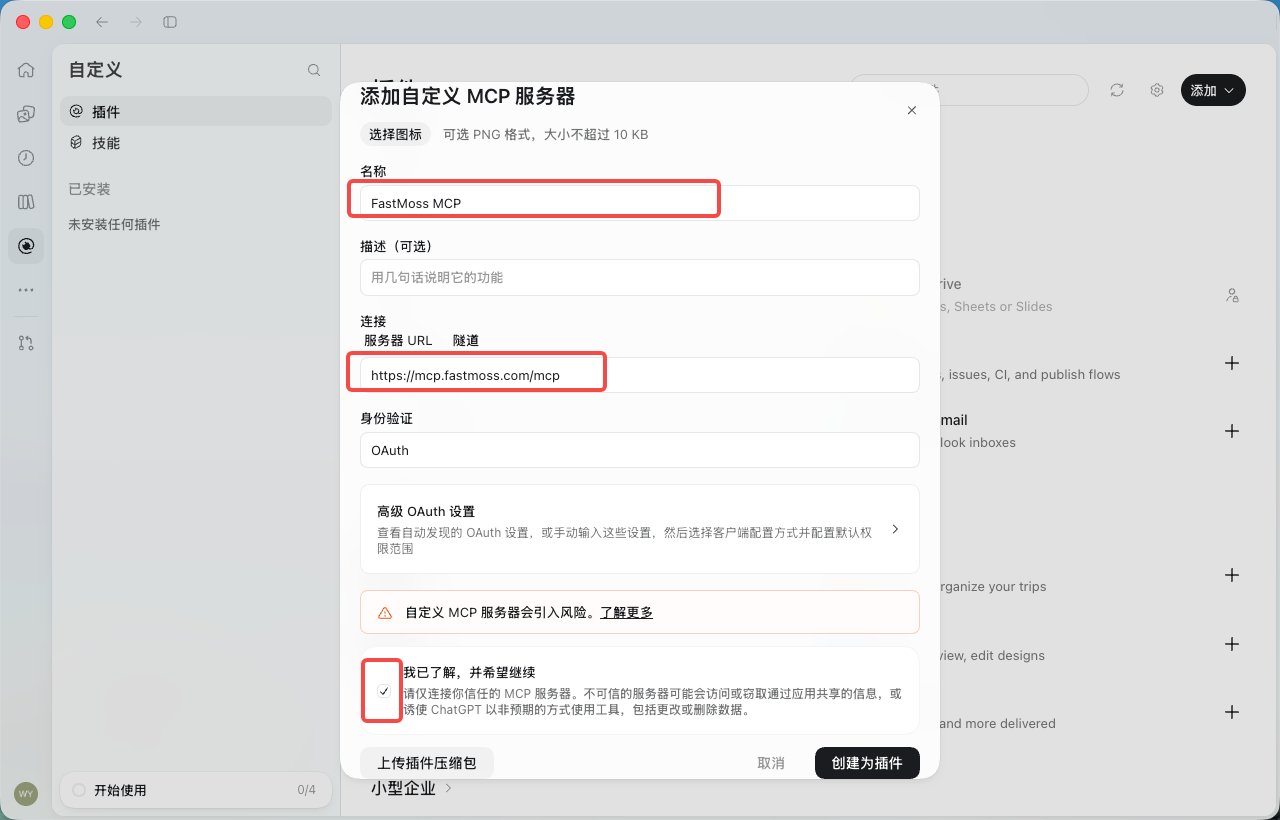
  • 4Enter "FastMoss MCP" as the name and https://mcp.fastmoss.com/mcp as the server URL, keep authentication as "OAuth", tick the risk acknowledgement, then click "Create as plugin". No API key is needed in the URL.名称填「FastMoss MCP」,服务器 URL 填 https://mcp.fastmoss.com/mcp,身份验证保持「OAuth」,勾选「我已了解,并希望继续」,然后点击「创建为插件」。URL 里不用带 API Key。名前に「FastMoss MCP」、サーバー URL に https://mcp.fastmoss.com/mcp を入力し、認証は「OAuth」のまま、リスク確認にチェックを入れて「プラグインとして作成」をクリック。URL に API キーは不要です。Enter "FastMoss MCP" as the name and https://mcp.fastmoss.com/mcp as the server URL, keep authentication as "OAuth", tick the risk acknowledgement, then click "Create as plugin". No API key is needed in the URL.Enter "FastMoss MCP" as the name and https://mcp.fastmoss.com/mcp as the server URL, keep authentication as "OAuth", tick the risk acknowledgement, then click "Create as plugin". No API key is needed in the URL.Setup screenshot 1
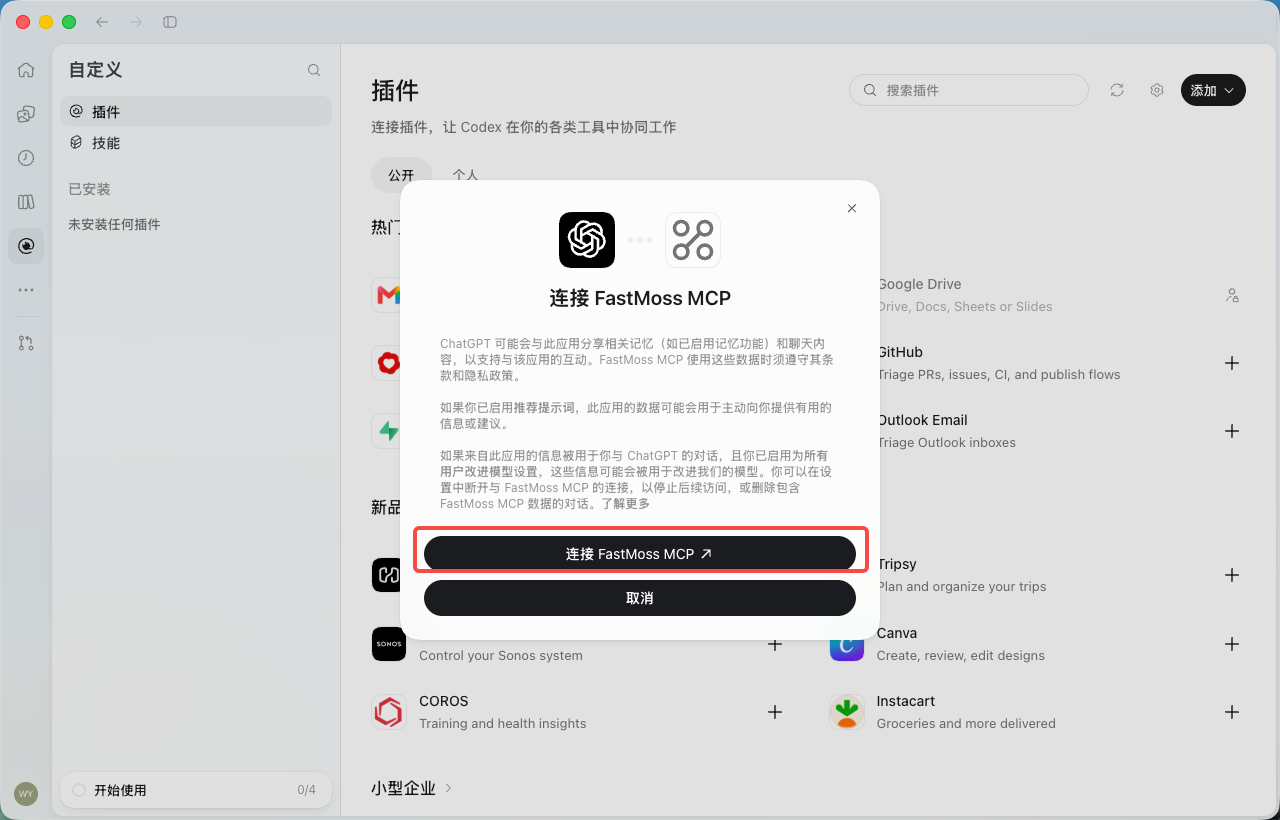
  • 5In the dialog, click "Connect FastMoss MCP". Your browser opens the FastMoss authorization page.在弹窗中点击「连接 FastMoss MCP」,浏览器会打开 FastMoss 授权页。ダイアログで「FastMoss MCP に接続」をクリックすると、ブラウザで FastMoss の認可ページが開きます。In the dialog, click "Connect FastMoss MCP". Your browser opens the FastMoss authorization page.In the dialog, click "Connect FastMoss MCP". Your browser opens the FastMoss authorization page.Setup screenshot 1
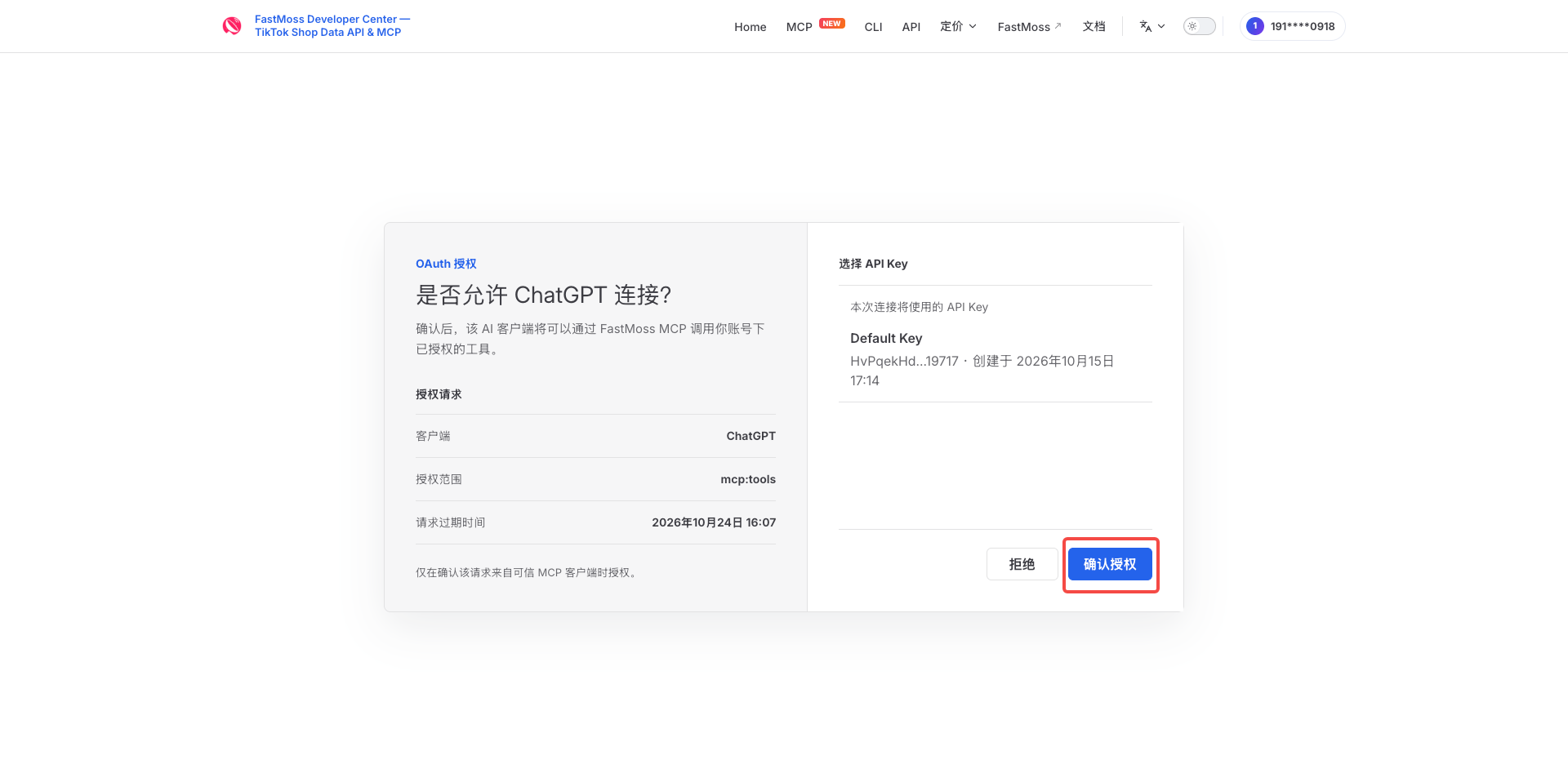
  • 6Sign in first if prompted, check that the client is ChatGPT, then click "Allow".未登录会先跳转登录。确认客户端是 ChatGPT,点击「确认授权」。未ログインの場合は先にログイン。クライアントが ChatGPT であることを確認し、「Allow」をクリック。Sign in first if prompted, check that the client is ChatGPT, then click "Allow".Sign in first if prompted, check that the client is ChatGPT, then click "Allow".Setup screenshot 1
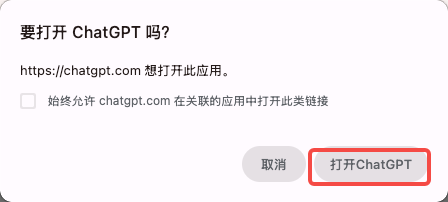
  • 7When the browser asks to open ChatGPT, click "Open ChatGPT".浏览器询问是否打开 ChatGPT 时,点击「打开ChatGPT」。ブラウザが ChatGPT を開くか確認したら「ChatGPT を開く」をクリック。When the browser asks to open ChatGPT, click "Open ChatGPT".When the browser asks to open ChatGPT, click "Open ChatGPT".Setup screenshot 1
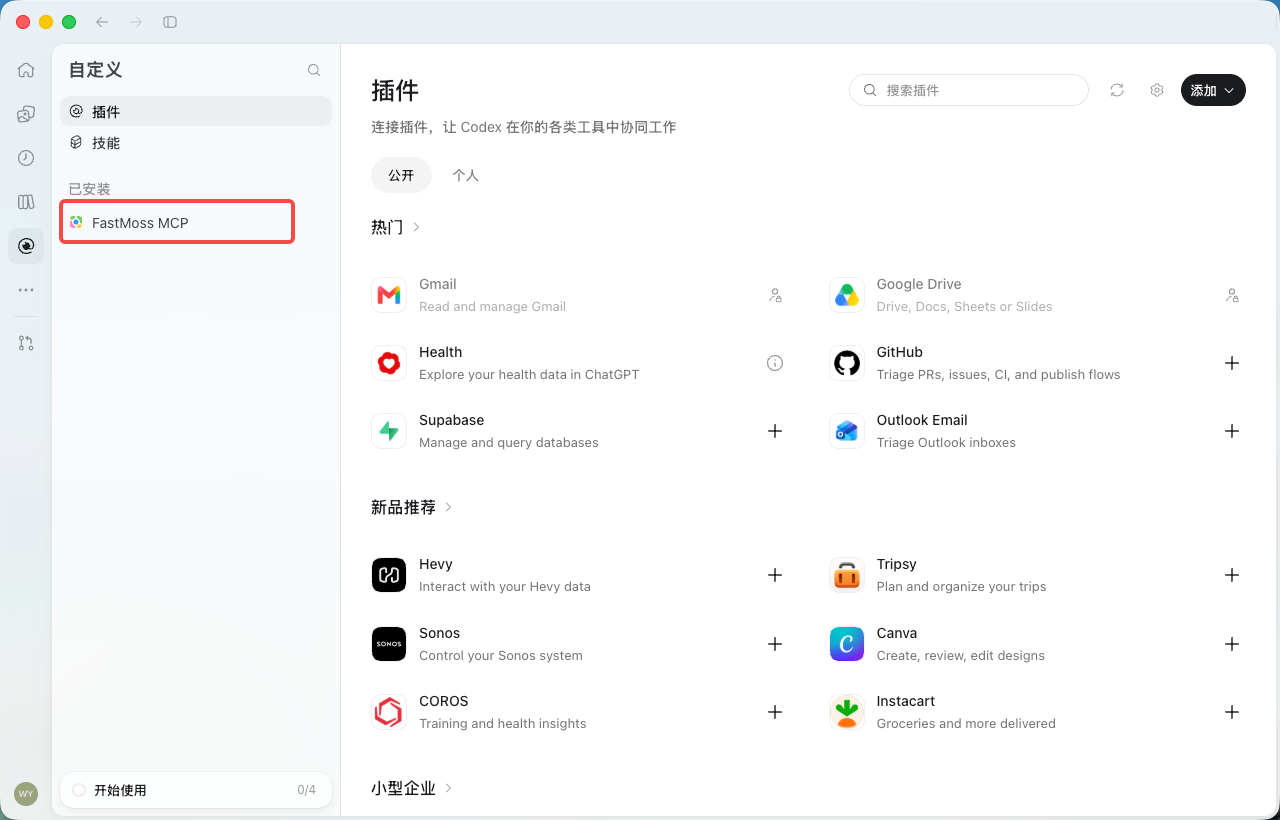
  • 8Back in the app, "FastMoss MCP" appears under "Installed" — your FastMoss MCP is all set.回到应用,「已安装」下出现「FastMoss MCP」,FastMoss MCP 就配置完成了。アプリに戻り、「インストール済み」に「FastMoss MCP」が表示されれば設定完了です。Back in the app, "FastMoss MCP" appears under "Installed" — your FastMoss MCP is all set.Back in the app, "FastMoss MCP" appears under "Installed" — your FastMoss MCP is all set.Setup screenshot 1
Config snippet配置片段設定スニペットFragmento de configuraciónTrecho de configuraçãoCuplikan konfigurasiส่วนโค้ดตั้งค่าĐoạn cấu hình
URLhttps://mcp.fastmoss.com/mcp

Verify your connection验证连接Verify your connectionVerifica tu conexiónVerifique sua conexãoVerifikasi koneksi Andaตรวจสอบการเชื่อมต่อของคุณXác minh kết nối của bạn

Paste this after setup. Live numbers back means you are connected.配置完成后粘贴这条。返回实时数字即表示已连接。セットアップ後にこれを貼り付けます。実際の数値が返ってくれば接続完了です。Pega esto después de la configuración. Si vuelven números en vivo, significa que estás conectado.Cole isto após a configuração. Números ao vivo de volta significam que você está conectado.Tempel ini setelah pengaturan. Angka langsung yang kembali berarti Anda terhubung.วางสิ่งนี้หลังตั้งค่า หากได้ตัวเลขจริงกลับมาแปลว่าคุณเชื่อมต่อแล้วDán đoạn này sau khi thiết lập. Nhận lại số liệu trực tiếp nghĩa là bạn đã kết nối.
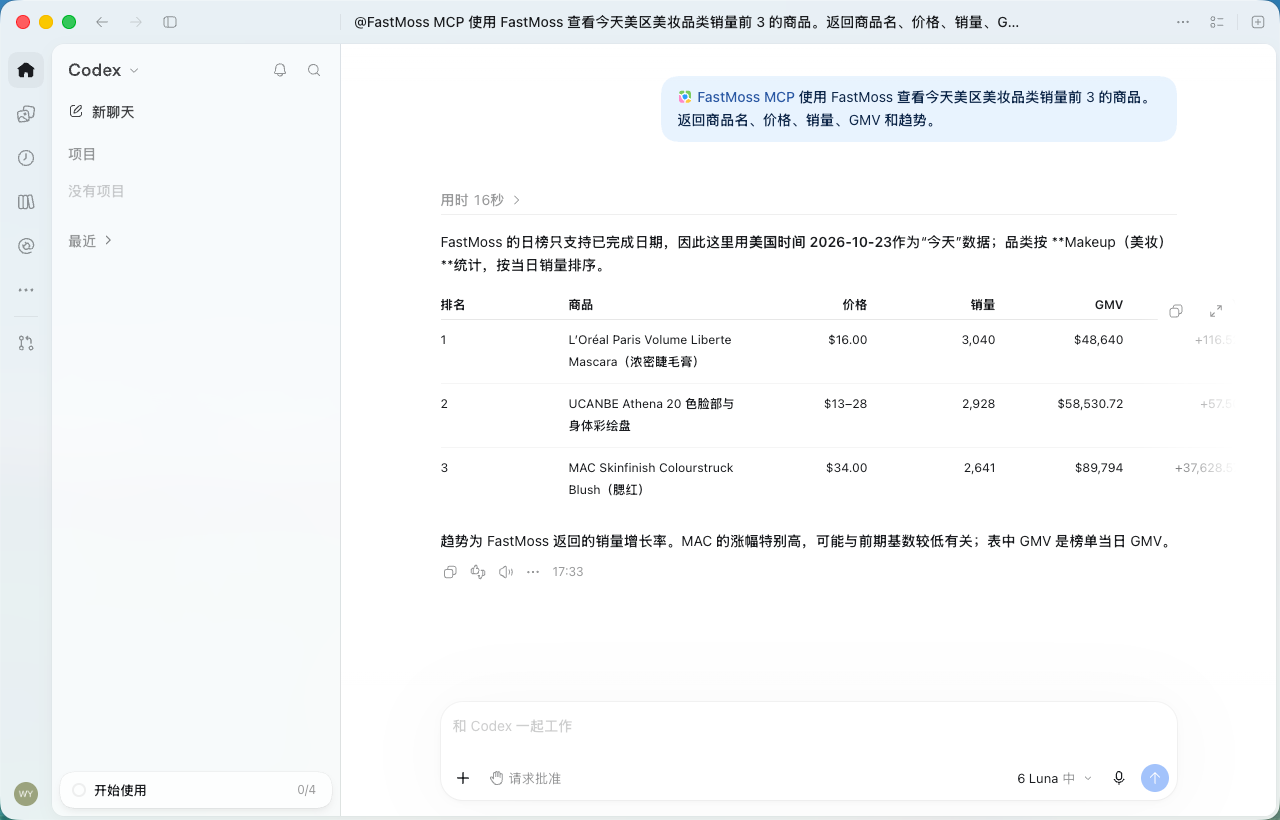
Use FastMoss MCP to show today's top 3 selling products in the US beauty category. Return product name, price, sales, GMV, and trend.使用 FastMoss MCP 查看今天美区美妆品类销量前 3 的商品。返回商品名、价格、销量、GMV 和趋势。Use FastMoss MCP to show today's top 3 selling products in the US beauty category. Return product name, price, sales, GMV, and trend.Usa FastMoss MCP para mostrar los 3 productos más vendidos de hoy en la categoría de belleza de EE. UU. Devuelve nombre del producto, precio, ventas, GMV y tendencia.Use o FastMoss MCP para mostrar os 3 produtos mais vendidos hoje na categoria de beleza dos EUA. Retorne nome do produto, preço, vendas, GMV e tendência.Gunakan FastMoss MCP untuk menampilkan 3 produk terlaris hari ini di kategori kecantikan AS. Kembalikan nama produk, harga, penjualan, GMV, dan tren.ใช้ FastMoss MCP แสดงสินค้าขายดี 3 อันดับแรกของวันนี้ในหมวดความงามของสหรัฐฯ คืนชื่อสินค้า ราคา ยอดขาย GMV และเทรนด์Dùng FastMoss MCP để hiện 3 sản phẩm bán chạy nhất hôm nay trong danh mục làm đẹp tại Mỹ. Trả về tên sản phẩm, giá, doanh số, GMV và xu hướng.
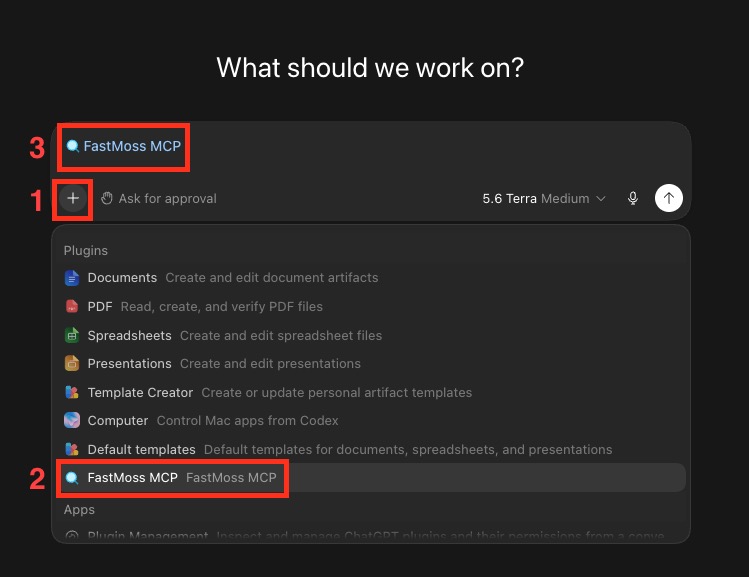
First, select the FastMoss MCP tool in the chat box — ChatGPT only uses it once it's picked:请先在对话框中选中 FastMoss MCP 工具——选中后 ChatGPT 才会使用它:First, select the FastMoss MCP tool in the chat box — ChatGPT only uses it once it's picked:Primero, selecciona la herramienta FastMoss MCP en el cuadro de chat — ChatGPT solo la usa una vez seleccionada:Primeiro, selecione a ferramenta FastMoss MCP na caixa de chat — o ChatGPT só a usa depois de selecionada:Pertama, pilih alat FastMoss MCP di kotak chat — ChatGPT hanya menggunakannya setelah dipilih:ขั้นแรก เลือกเครื่องมือ FastMoss MCP ในกล่องแชท — ChatGPT จะใช้ก็ต่อเมื่อถูกเลือกแล้วเท่านั้น:Trước tiên, chọn công cụ FastMoss MCP trong hộp chat — ChatGPT chỉ dùng nó sau khi đã được chọn:
  1. Click the "+" button in the chat box.点击对话框中的「+」按钮。Click the "+" button in the chat box.Haz clic en el botón "+" del cuadro de chat.Clique no botão "+" na caixa de chat.Klik tombol "+" di kotak chat.คลิกปุ่ม "+" ในกล่องแชทNhấp vào nút "+" trong hộp chat.
  2. Choose "FastMoss MCP" from the Plugins list.在 Plugins 列表中选择「FastMoss MCP」。Choose "FastMoss MCP" from the Plugins list.Elige "FastMoss MCP" en la lista de Plugins.Escolha "FastMoss MCP" na lista de Plugins.Pilih "FastMoss MCP" dari daftar Plugins.เลือก "FastMoss MCP" จากรายชื่อ PluginsChọn "FastMoss MCP" từ danh sách Plugins.
  3. "FastMoss MCP" now shows above the input box — you're ready to run the prompt below.「FastMoss MCP」会出现在输入框上方——接着就可以执行下面的问题了。"FastMoss MCP" now shows above the input box — you're ready to run the prompt below."FastMoss MCP" ahora aparece sobre el cuadro de entrada: ya puedes ejecutar el prompt de abajo."FastMoss MCP" agora aparece acima da caixa de entrada — você está pronto para executar o prompt abaixo."FastMoss MCP" kini muncul di atas kotak input — Anda siap menjalankan prompt di bawah.ตอนนี้ "FastMoss MCP" แสดงอยู่เหนือกล่องกรอกข้อมูล — คุณพร้อมรันพรอมป์ด้านล่างแล้ว"FastMoss MCP" giờ hiện phía trên hộp nhập liệu — bạn đã sẵn sàng chạy prompt bên dưới.ChatGPT chat box — click +, choose FastMoss MCP from Plugins, and it appears above the input box
Live numbers like below mean you're connected:返回下图这样的实时数据,就说明连接成功了:下図のような実データが返れば接続完了です:Si vuelven datos en vivo como abajo, estás conectado:Se voltarem dados ao vivo como abaixo, você está conectado:Jika data langsung seperti di bawah kembali, Anda sudah terhubung:หากได้ข้อมูลจริงแบบด้านล่าง แปลว่าเชื่อมต่อแล้ว:Nếu trả về dữ liệu trực tiếp như bên dưới, bạn đã kết nối:
Codex desktop app — FastMoss MCP returned the top 3 US makeup products

Community & support社区与支持コミュニティとサポートComunidad y soporteComunidade e suporteKomunitas & dukunganชุมชนและการสนับสนุนCộng đồng & hỗ trợ

Got stuck? Reach us on Discord, our Lark group, or by email — whichever works for you.遇到问题?通过 Discord、飞书群或邮件联系我们,哪种方便用哪种。行き詰まりましたか?Discord、Larks グループ、またはメールでお問い合わせください。¿Te quedaste atascado? Contáctanos por Discord, nuestro grupo de Lark o por correo — lo que te funcione.Empacou? Fale conosco pelo Discord, nosso grupo no Lark ou por e-mail — o que funcionar para você.Bingung? Hubungi kami di Discord, grup Lark kami, atau lewat email — mana pun yang cocok untuk Anda.ติดปัญหาหรือ? ติดต่อเราได้ทาง Discord กลุ่ม Lark ของเรา หรือทางอีเมล — เลือกวิธีที่สะดวกสำหรับคุณGặp khó khăn? Hãy liên hệ chúng tôi trên Discord, nhóm Lark của chúng tôi, hoặc qua email — bất cứ cách nào thuận tiện cho bạn.
Email support邮件联系メールサポートSoporte por correoSuporte por e-mailDukungan emailการสนับสนุนทางอีเมลHỗ trợ qua email
Send us an email — we reply within 24 hours.给我们发邮件,24 小时内回复。メールをお送りください。24 時間以内に返信します。Envíanos un correo — respondemos en menos de 24 horas.Envie-nos um e-mail — respondemos em até 24 horas.Kirim email kepada kami — kami membalas dalam 24 jam.ส่งอีเมลถึงเรา — เราตอบกลับภายใน 24 ชั่วโมงGửi email cho chúng tôi — chúng tôi phản hồi trong vòng 24 giờ.